
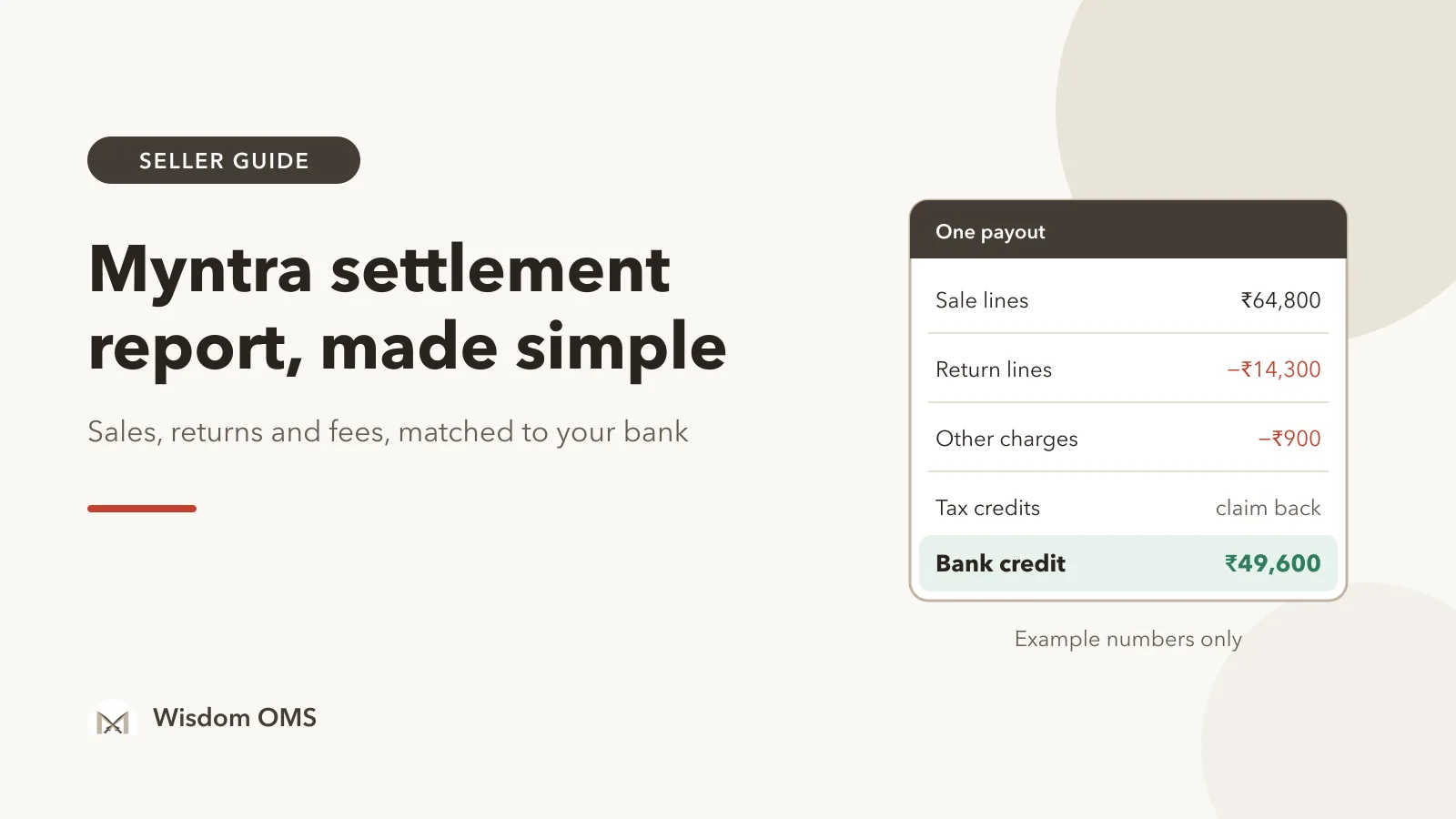
Myntra credited ₹49,600 to your bank this week. Your dispatch register says you shipped goods worth far more. You open the Myntra settlement report to find the difference and meet several files, dozens of columns, and negative amounts against orders you were sure had already been paid. Most sellers give up here and simply trust the deposit.
That trust is expensive. Fashion has a high return rate, and on Myntra every return shows up as money taken back from a later payout. If you never match the files to your orders, a missed payment or a wrong deduction can sit unnoticed for months.
This guide explains the report the way an experienced seller reads it: which file shows what, why a single order can appear twice, and a weekly routine for Myntra payment reconciliation that needs only the Partner Portal and a spreadsheet.
Key takeaways
- Myntra reports money in two directions: sale lines that pay you and return lines that take money back. Your bank credit is the two added together, less any other charges.
- A returned order appears twice, once as a payment and later as a reversal. Seeing a negative amount does not mean something went wrong.
- Match on Myntra's line-level ID, not the order number, because one order can hold several items that are paid and returned separately.
- Sort every gap into three piles: not settled yet, reversed for a return, or unexplained. Only the last pile needs a ticket.
What is the Myntra settlement report?
The Myntra settlement report is the line-by-line record of what Myntra paid you and what it took back: each sold item, each returned item, the fees and taxes on them, and the date the money was settled. You download it from the reports and payments area of the Myntra Partner Portal for a date range.
It is easier to read once you know that it is not one sheet but a small set of them. Names and menu positions on the portal change over time, so go by what each file contains:
| File | What it lists | Effect on your payout |
|---|---|---|
| Sale side (often called forward) | Items you shipped that were delivered and paid | Adds money |
| Return side (often called reverse) | Items that came back after you were paid | Takes money back |
| Unsettled | Sales and returns that are recorded but not paid or adjusted yet | None yet; this is what is coming |
| Other charges | Amounts not tied to any single order | Usually takes money out |
A few terms in plain words. A settlement is one transfer of money from Myntra to you; its bank reference is usually called the UTR. A reversal is money taken back from an earlier settlement because the item was returned. An order line is one item inside an order; Myntra pays and reverses line by line, so the line ID is the key you match on.
Where does the money on one Myntra order go?
For each item, Myntra starts from what the customer paid and deducts its commission, the logistics charge and two tax deductions; what is left is the settled amount for that line. The report shows each piece in its own column, so every deduction can be checked.
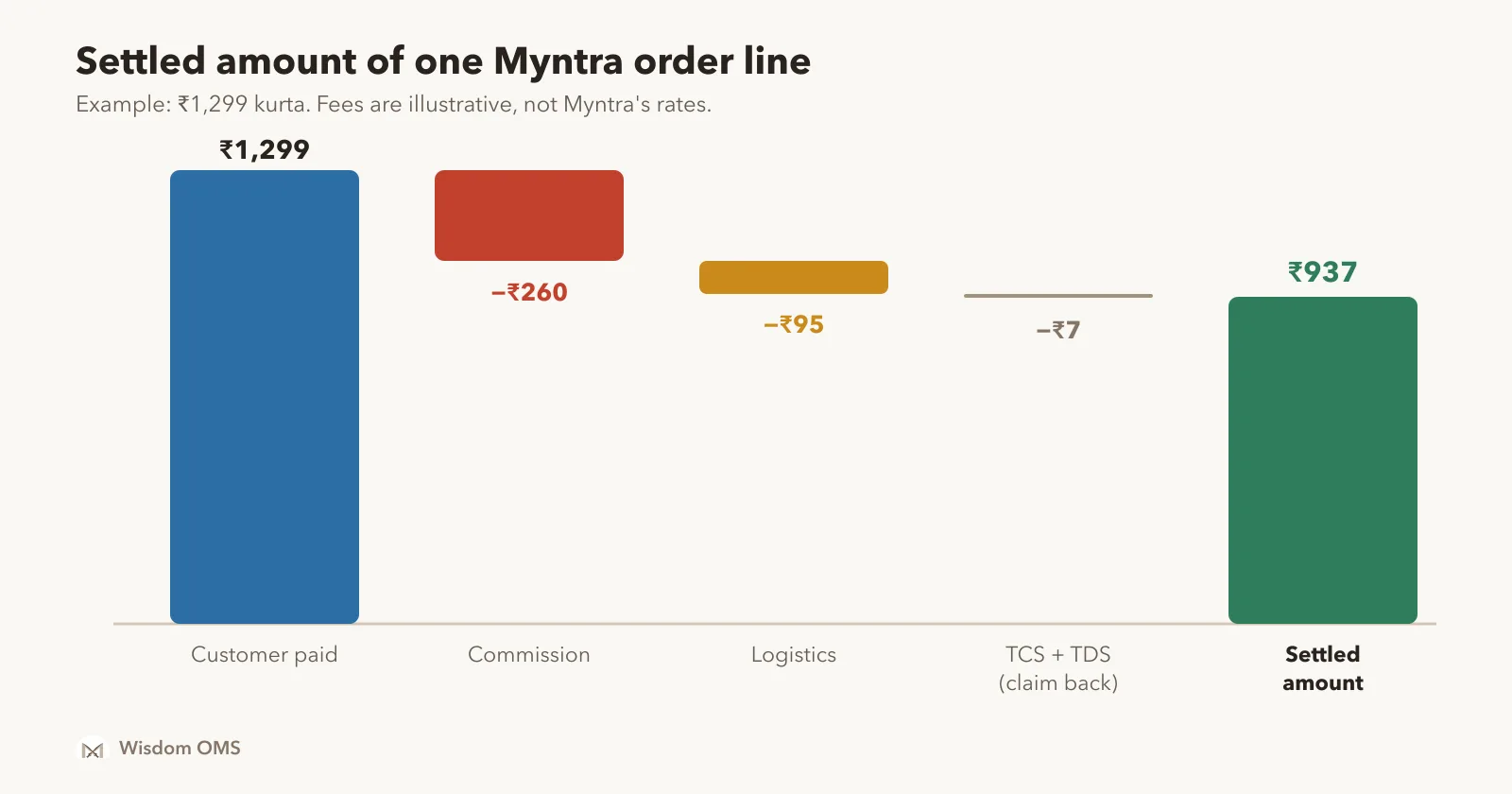
Take a kurta the customer bought for ₹1,299. In this example the commission comes to ₹260 and the logistics charge to ₹95. Two small taxes, TCS and TDS, add up to ₹7. The settled amount is ₹1,299 minus ₹260, minus ₹95, minus ₹7, which is ₹937.
The two taxes are not lost money. TCS is tax the marketplace collects under GST and deposits against your GSTIN; the current rate was set by Notification 15/2024-Central Tax, and the amount shows up as a credit you can use to pay GST. TDS is income tax deducted in advance, which you claim when you file your return. Our guide to GST for marketplace sellers explains how to get the TCS credit back; the steps are the same for Myntra.
Commission and logistics rates depend on your category, your agreement and the selling price, and they change. Do not copy a rate from any blog, including this one. Take the figures from your own report and from the rate card on your Partner Portal.
Why does the same order appear twice?
An order appears twice when the customer returned it after you were paid: once on the sale side as a payment, and later on the return side as a reversal. The two lines usually fall in different payouts, which is why a week's deposit can look smaller than that week's sales.
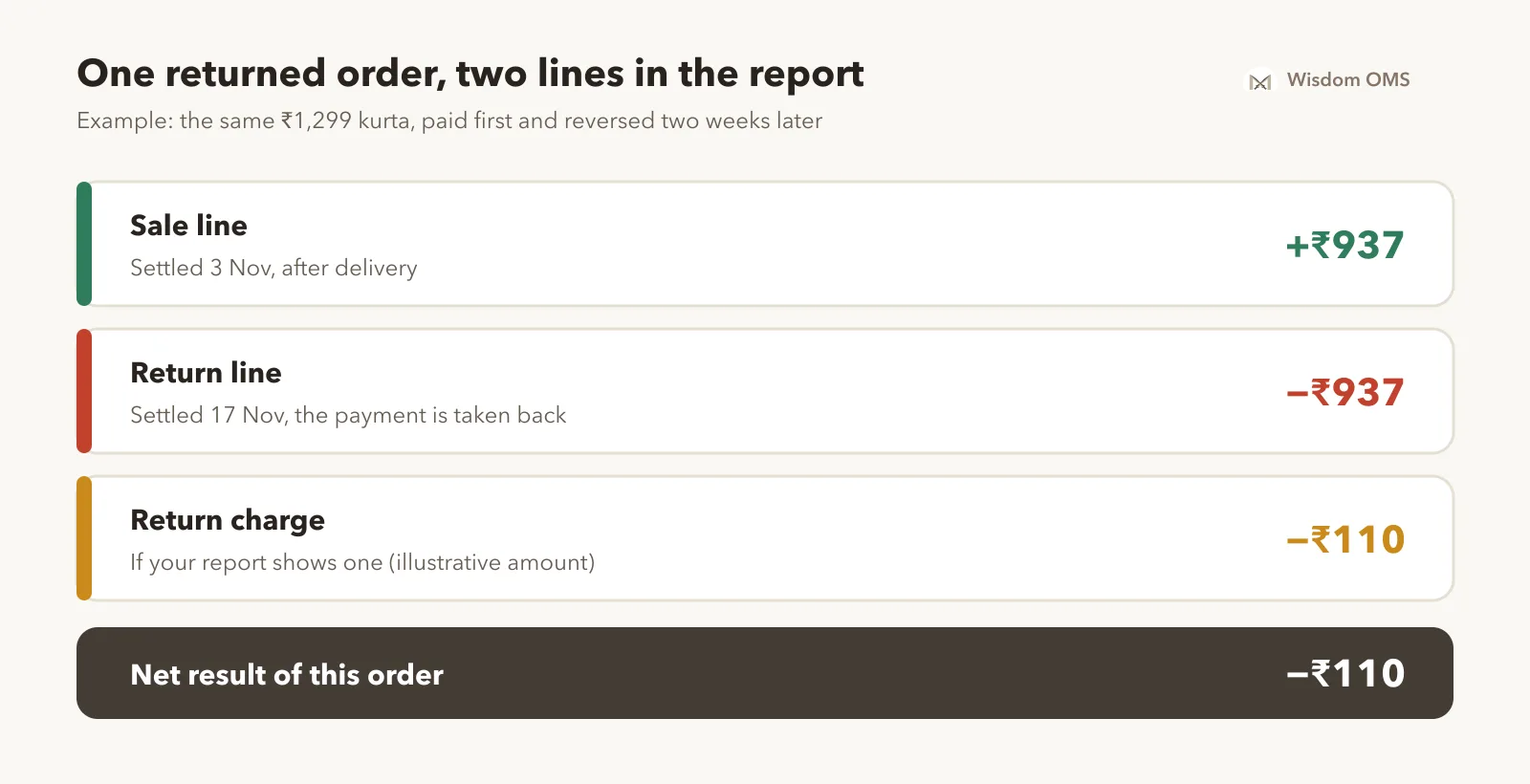
Follow the same kurta. On 3 November the sale side shows +₹937. The customer returns it, and on 17 November the return side shows −₹937. If your report also shows a return charge, say ₹110 in this example, the order has cost you ₹110 even though you have the goods back. That number belongs in your profit sheet.
Two checks are worth doing on every reversal:
- Did the parcel come back? If money was reversed but the item never reached your godown, or came back damaged or swapped, you may have a claim. Myntra's Seller Protection Fund policy sets out what qualifies and how to apply; our post on wrong return claims on Flipkart and Myntra covers the proof you need.
- Was it reversed once? Search the return side for the line ID. One return should give one reversal of the same size as the original payment.
Why does your bank credit not match your sales?
Your bank credit is the sale side minus the return side, minus any charges not tied to an order. Sales alone will never match the bank, because returns from earlier weeks are deducted from this week's payout.
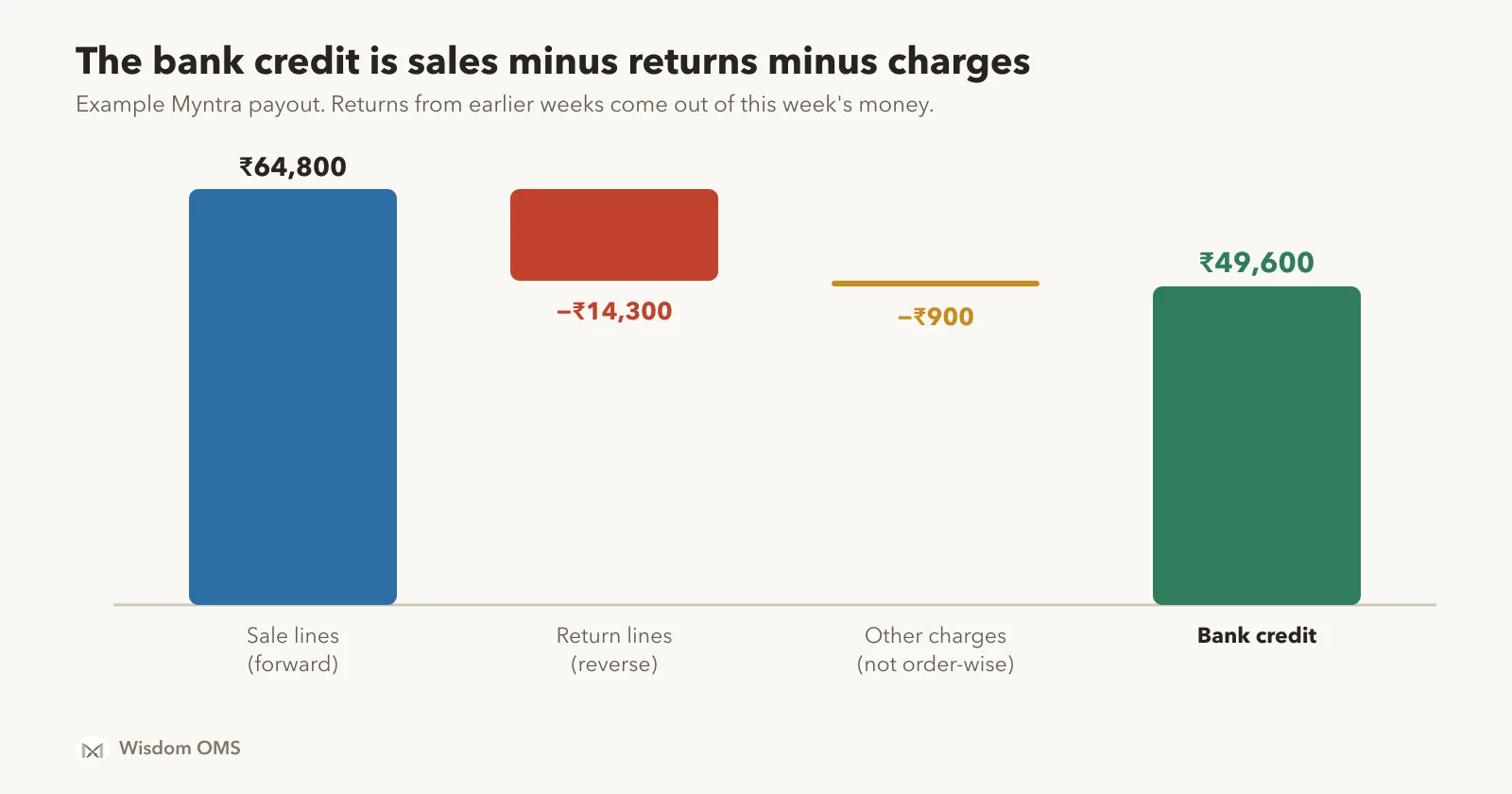
In the example above, the sale lines settled this week add up to ₹64,800. Return lines take back ₹14,300, mostly for orders delivered two or three weeks ago. Other charges come to ₹900. So ₹64,800 − ₹14,300 − ₹900 = ₹49,600, which is exactly the deposit. Nothing is missing; the money is simply spread across files.
If the three totals do not add up to the deposit, check the date range first. A payout often covers a few days on either side of the week you picked. Match on the settlement date and UTR printed in the file, not on the order date.
How to do Myntra payment reconciliation every week
Reconcile from the bank downwards: confirm the totals explain the deposit, then match orders line by line, then deal only with what is left. Twenty minutes a week is enough for most sellers.
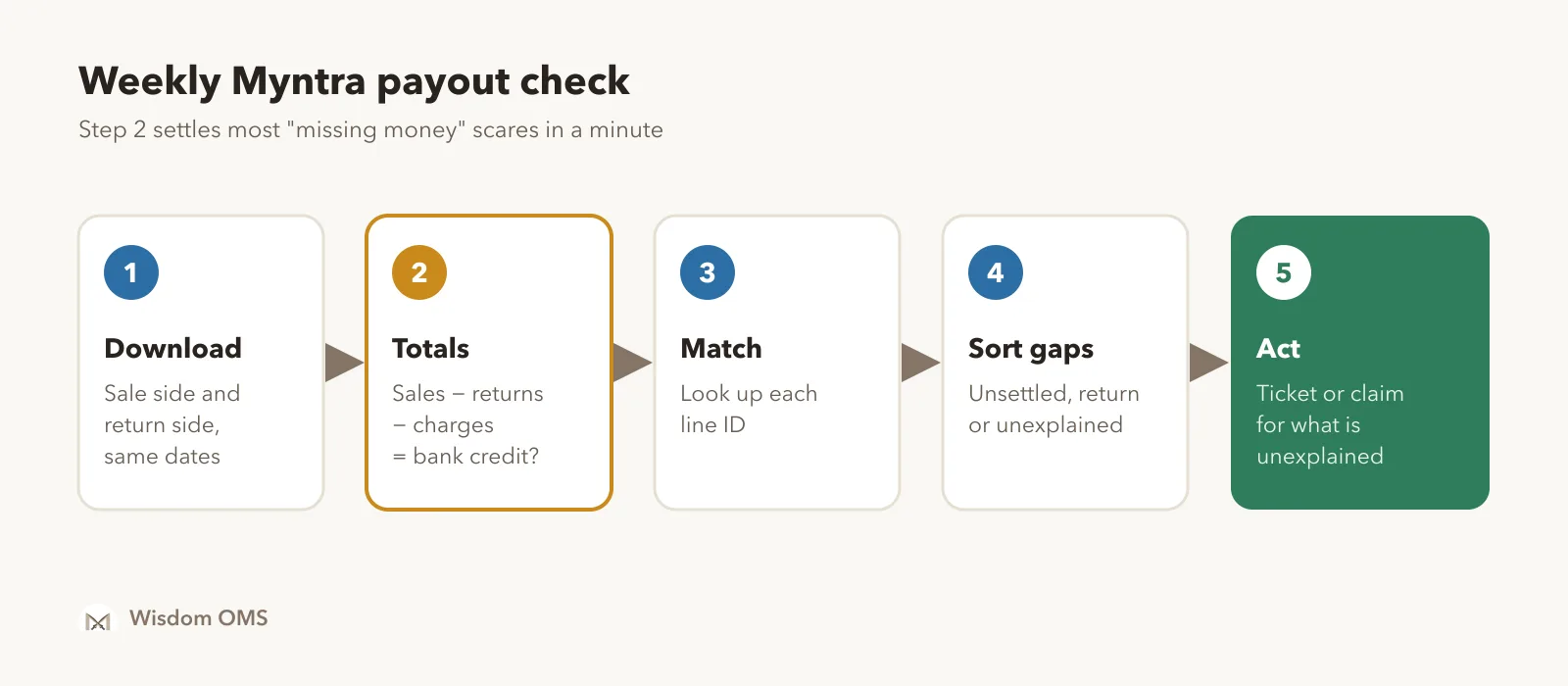
- Download both sides. Take the sale-side and return-side files for the same dates, plus the other-charges file if you have one.
- Check the totals. Sale total minus return total minus other charges should equal the bank credit for each UTR.
- Match on line ID. Put your delivered orders in one sheet and look up each line ID in the sale-side file. A multi-item order needs one match per item.
- Sort the gaps. A delivered line with no payment is either in the unsettled file (wait), reversed for a return (check the parcel), or unexplained.
- Act on the unexplained. Raise a ticket on the Partner Portal with the order number, line ID and the dates. Note the ticket number against the order so you can follow up.
Keep one more list: lines that have stayed in the unsettled file for longer than your usual payment cycle. Those are the ones that quietly get forgotten. If you sell on other marketplaces too, the same routine works there; see how to read the Flipkart settlement report.
How Wisdom OMS handles this
The routine above works, but it means building a new spreadsheet every week. Wisdom OMS keeps the same check running against your orders, so you only look at the exceptions.
- Upload the report as it is. Myntra sellers can upload the settlement report straight from the Payments screen. Each order then shows its payment, order-wise.
- Look up any order in seconds. Type an order number in the Payments search box to see its expected and received payments. View on Myntra in the order details shows the order's status, journey and payout as the marketplace reports it.
- See late payments in one click. Payments > Unpaid shows each order's delivered date, and a chip lists orders still unpaid more than 10 days after delivery.
- Know the real margin. Orders show cash margin after marketplace deductions, with expected and received amounts clearly marked, so you see what each order really earned.
- Tick off the bank. In Bank Reconciliation you tick the payouts that actually reached your account. Whatever is left has not arrived.
- Claim wrong returns on the spot. Scan a Myntra return under Scan Wrong Return and file the claim right there, saved against the order.
At month end, your Myntra sales and returns can also go into Wisdom Accounts for GST. And because Myntra orders sit in the same screens as your other stores, the daily work described in our Myntra order processing guide and the money check happen in one place.
Frequently asked questions
What is Myntra payment reconciliation?
Myntra payment reconciliation means checking that every delivered order was paid the right amount and that every reversal belongs to a real return. You compare your own order list with the sale and return files from the Partner Portal, then compare the totals with your bank statement. The goal is a short list of orders that are unpaid or wrongly deducted.
Where can I download the Myntra settlement report?
You download it from the Myntra Partner Portal, in the area for reports and payments. Menu names change from time to time, so look for payment or settlement reports and choose the date range you need. Download the sale side and the return side for the same dates.
Why is my Myntra payment less than my sales?
A Myntra payment is lower than sales because commission, logistics charges, TCS and TDS are deducted from every item, and returns from earlier weeks are taken back from the current payout. Charges not tied to an order can reduce it further. Orders delivered recently may also still be unsettled and paid in a later cycle.
Why does a Myntra order show a negative amount?
A negative amount is a reversal: Myntra is taking back a payment it made earlier because the customer returned the item. Check that the reversal equals the original payment, that it appears only once, and that the parcel actually came back to you in good condition. If the parcel is missing or wrong, apply for a claim.
How often should I reconcile Myntra payments?
Once a week suits most sellers, right after a payout reaches the bank. Weekly checks keep the list of gaps short and leave you enough time to raise a ticket or claim while the order is still recent. Do a fuller check at month end, before you file GST returns.
Start from the deposit, end with a short list
The Myntra settlement report answers one question: how did Myntra get from your sales to this deposit? Add the sale side, subtract the return side and other charges, match on line ID, and chase only the unexplained lines. Start free with Wisdom OMS to see each Myntra order's payment without building the sheet yourself. Prefer your phone? Get the Wisdom app on Google Play.