
Around the 8th of every month the same message arrives from the CA: "Send Meesho sales data." You download a file or two from the supplier panel, forward them, and hope for the best. A week later the CA says the GST payable is higher than you expected, and you cannot tell whether that is right.
GST for Meesho sellers is not complicated, but it has three parts that trip people up: whether you need a GSTIN at all, the small tax Meesho holds back from every payout (TCS), and the two returns due each month. Miss the TCS step alone and, on ₹5 lakh of net sales a month, about ₹2,500 of your own money stays stuck every month.
This guide explains all three in plain words, with one worked example. It is general information for sellers, not tax advice. Rates and due dates change, so confirm the final figures with your CA or on the GST portal.
Key takeaways
- You can sell on a marketplace without a GSTIN only on an enrolment number, and only to buyers in your own state. To sell across India you need regular GST registration.
- TCS is tax the marketplace collects from your payout and deposits in your name. It is not a fee. You get it back by accepting it on the GST portal.
- A regular GST-registered seller files two returns a month: GSTR-1 (sales) by the 11th and GSTR-3B (payment) by the 20th of the next month.
- GST is calculated on your sale value less returns, never on the payout that reached your bank.
Do Meesho sellers need GST registration?
Yes, if you want to sell to buyers outside your own state. A seller without a GSTIN can sell through a marketplace only on an enrolment number, and that route is limited to buyers inside the seller's own state.
Until 2023, anyone selling goods through an online marketplace had to register for GST from the first sale, whatever the turnover. From 1 October 2023 the government opened a second route. Notification 34/2023-Central Tax exempts small sellers of goods on marketplaces from registration, with these conditions:
- Your total turnover stays within the limit above which GST registration is compulsory in your state (₹40 lakh for goods in most states, lower in some; confirm yours).
- You make no inter-state supply. Every buyer must be in your own state.
- You sell through marketplaces from one state or union territory only.
- You have a PAN, and you declare it with your business address on the GST portal.
- The portal validates the PAN and gives you an enrolment number. You cannot sell through a marketplace before you have it.
The enrolment number is free to get and has no monthly returns. The cost is reach. A kurti seller in Surat on this route can be shown only to buyers in Gujarat, so most of the country never sees the catalogue. Check Meesho's current onboarding rules too, because the marketplace decides how it applies this route.
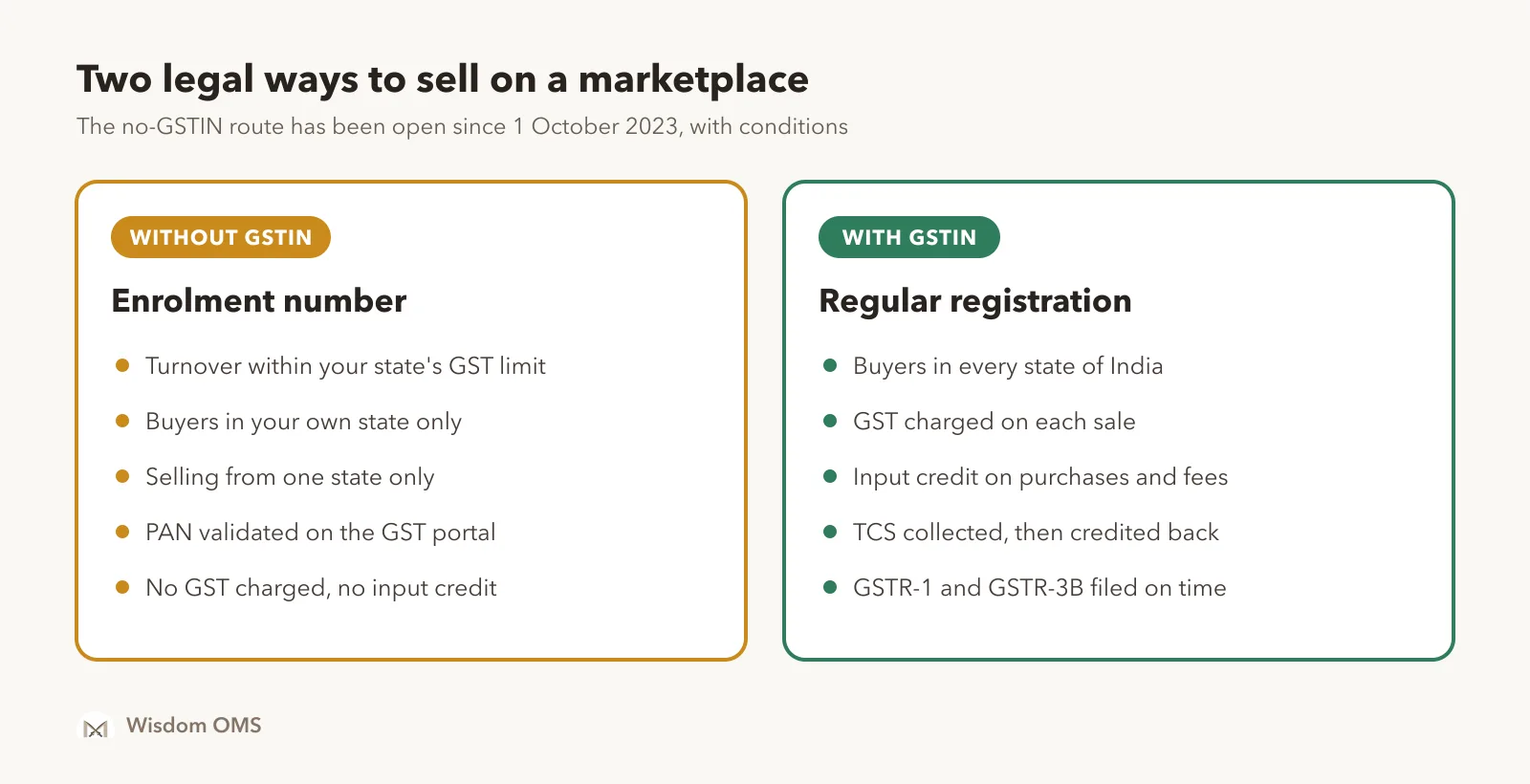
A GSTIN is your 15-character GST registration number. Registration is done online on the GST portal (gst.gov.in) and the government charges no fee for it. Once registered, you charge GST on every sale, you can claim input credit, and you must file returns every period, even when you have no sales.
What is TCS on Meesho, and how do you get it back?
TCS (tax collected at source) is a small part of your sale value that the marketplace holds back from your payout and deposits with the government in your name. It is an advance payment of your own GST, so you get its full value back as credit.
The rate is 0.5% of the net value of your taxable sales through the marketplace, that is, sales less returns, before GST. It was 1% until July 2024, when Notification 15/2024-Central Tax halved the central part to 0.25%, with the state part matching it.
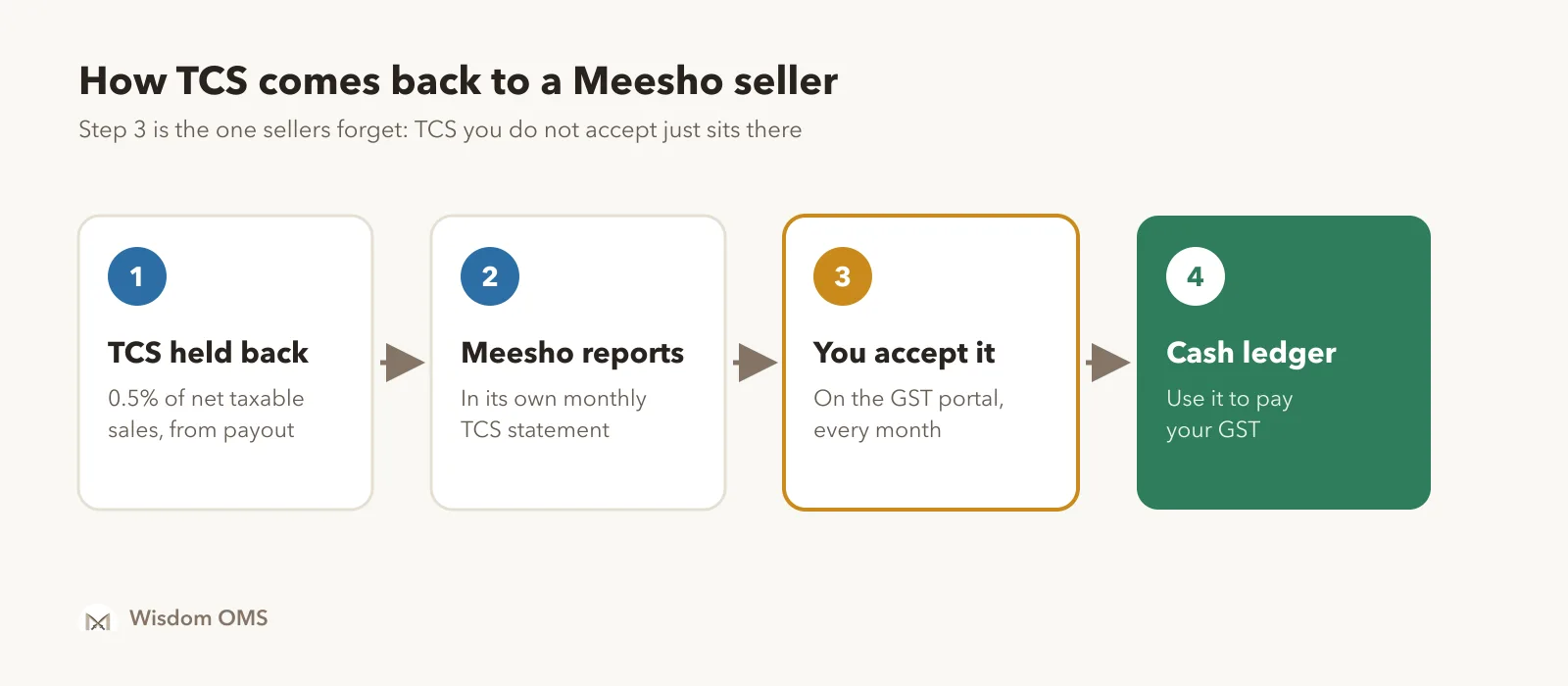
The money does not come back on its own. Each month:
- The marketplace holds back TCS from your payouts.
- It reports the amount against your GSTIN in its own monthly TCS statement.
- The amount appears on the GST portal under TDS and TCS credit received. You, or your CA, accept it there.
- Once accepted, it lands in your electronic cash ledger, the balance on the GST portal that works like money already paid. You use it to pay your GST for the month.
If you sell on Flipkart, Amazon or Myntra as well, each one collects and reports its own TCS, so you will see one line per marketplace. Check each line against that marketplace's own TCS or tax report before you accept it. A mismatch is far easier to raise in the same month than a year later.
Which GST returns does a Meesho seller file, and when?
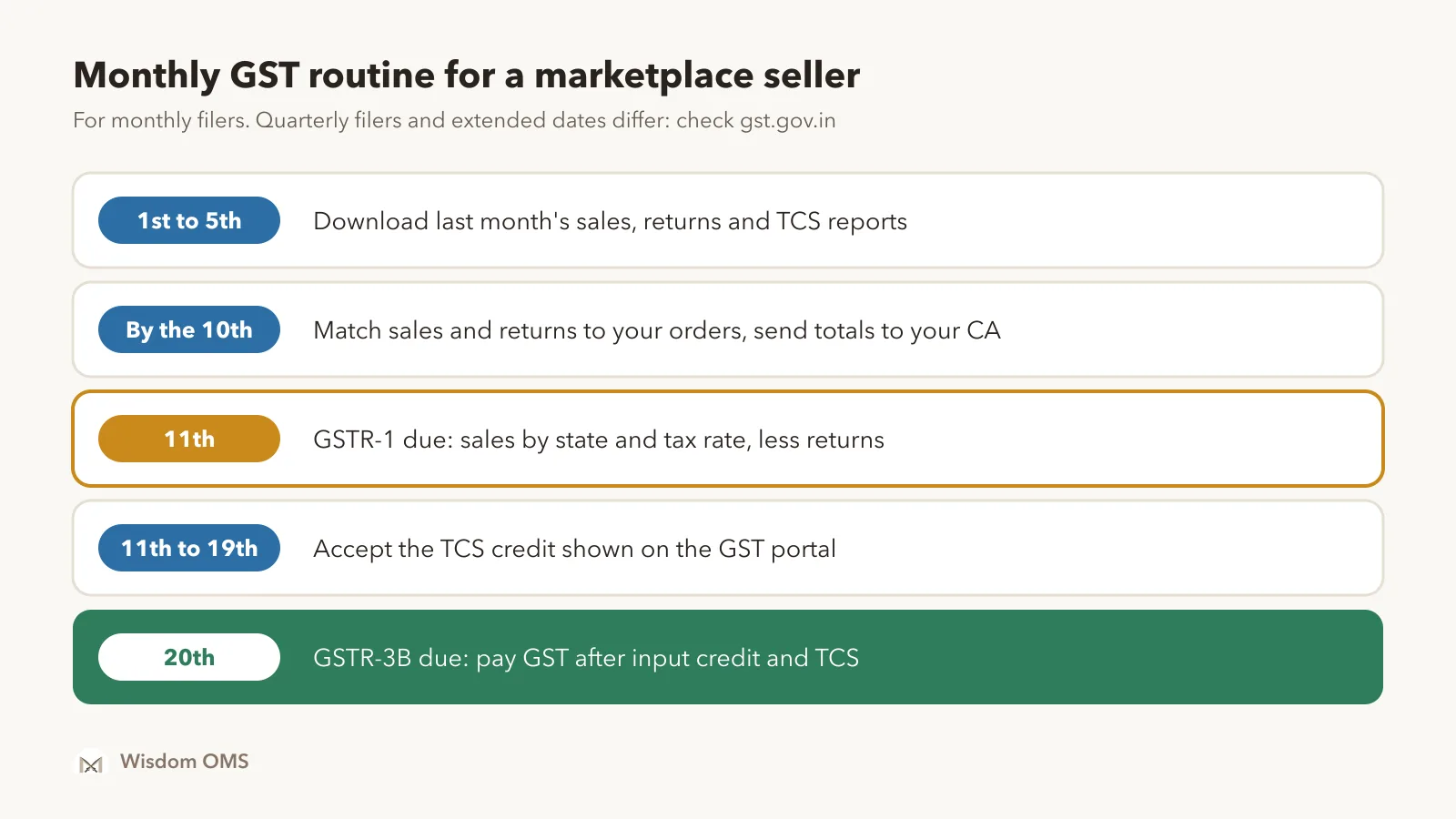
A regular GST-registered seller files GSTR-1 and GSTR-3B. Monthly filers send GSTR-1 by the 11th and GSTR-3B by the 20th of the following month, so November sales are reported by 11 December and paid for by 20 December.
| Return | What it is | Due date (monthly filers) |
|---|---|---|
| GSTR-1 | Statement of your sales for the month | 11th of the next month |
| GSTR-3B | Summary of tax due, credits used and the payment | 20th of the next month |
Smaller sellers can choose to file quarterly and pay monthly; the dates are different, so ask your CA which option you are on. The government also extends dates now and then. The GST portal shows the current due date for your GSTIN.
Three things about GSTR-1 are specific to marketplace sellers:
- Sales go in as totals, not bill by bill. Almost all your buyers are consumers without a GSTIN, so their sales are reported as totals by state and by tax rate. That is why your CA asks for a state-wise summary.
- Returns reduce your sales. An RTO (the buyer never accepted the parcel) or a customer return (the buyer sent it back later) cancels the sale, so its value comes off the month's totals. If you do not report returns, you pay GST on sales that never happened.
- Marketplace sales are also shown separately. GSTR-1 has a table (Table 14) for sales made through online marketplaces, marketplace by marketplace. It does not add tax; it lets the department match your figure with what the marketplace reported.
Meesho gives registered sellers a monthly GST report in the supplier panel; sellers usually find it in the Payments section, though menu names change. Download the sales file, the returns file and the TCS figure for the same month, and keep all three together.
How to calculate GST payable on Meesho sales: a worked example
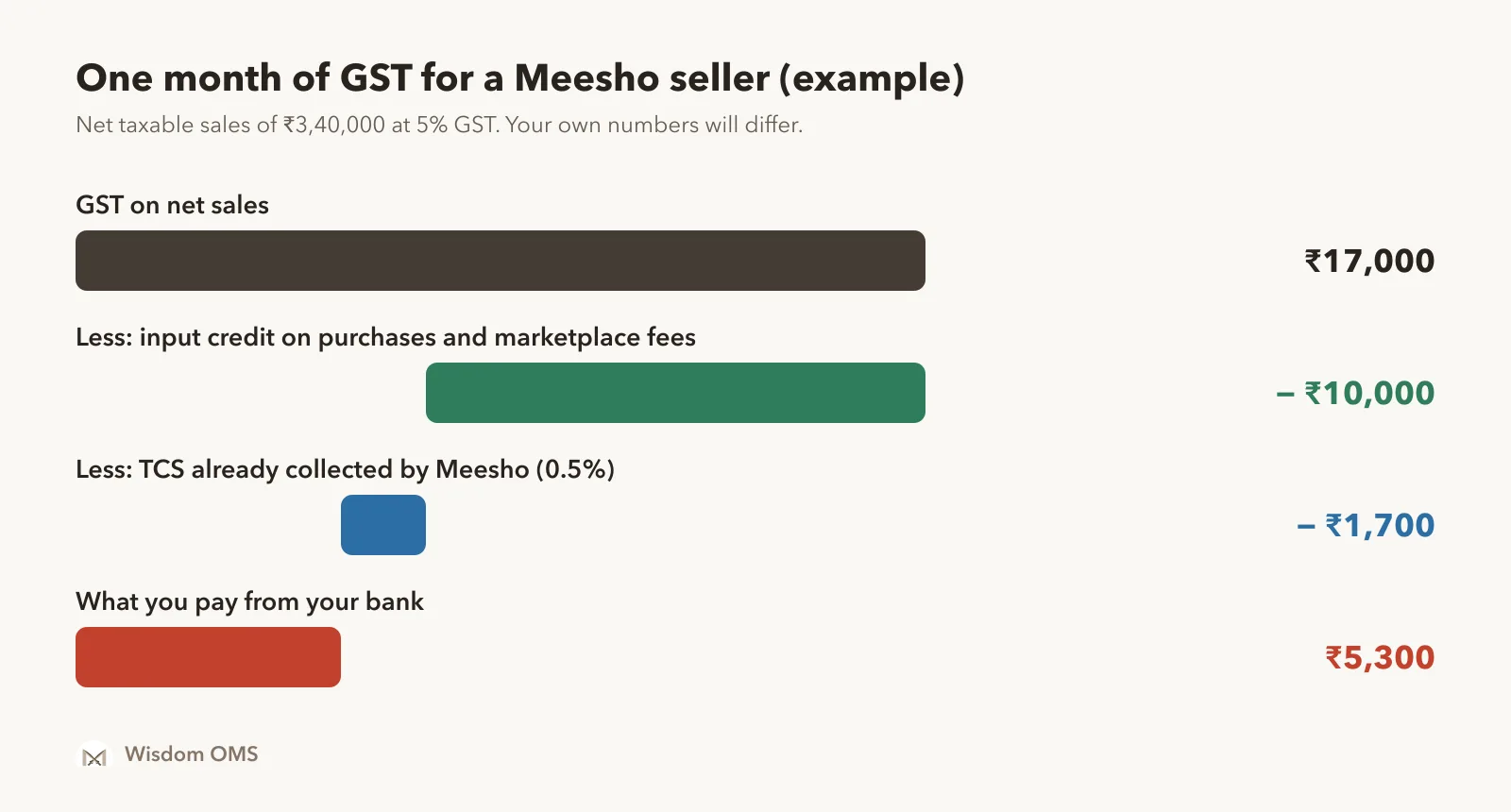
GST payable is the GST on your net sales, minus input credit, minus the TCS already collected. Here is one month for a hypothetical seller whose products are taxed at 5%. The numbers are an example; use your own rate and reports.
| Line | Amount |
|---|---|
| Sales for the month (value before GST) | ₹4,00,000 |
| Less: RTO and customer returns | ₹60,000 |
| Net taxable sales | ₹3,40,000 |
| GST on net sales at 5% | ₹17,000 |
| Less: input credit (GST paid on purchases and on marketplace fee invoices) | ₹10,000 |
| GST still due | ₹7,000 |
| Less: TCS collected by Meesho (0.5% of ₹3,40,000) | ₹1,700 |
| Paid from your bank | ₹5,300 |
Input credit (input tax credit) is the GST you paid on your own purchases: fabric, finished goods, packing material. The marketplace also charges GST on its shipping and other fees. When those invoices carry your GSTIN, that GST is normally available as credit too, so ask your CA to include them.
Notice what is missing from the table: the payout. The amount that reached your bank is after shipping, fees and TCS, so it is always lower than the sale value. GST is charged on the sale value. Sellers who hand their CA the bank credits instead of the sales report get the tax wrong every time. To check the payout side separately, see our guide to Meesho payment reconciliation, and for the full per-order picture, the Meesho profit calculator method.
Five GST mistakes that cost marketplace sellers money
Most GST losses come from missing paperwork, not from the tax itself. These five are the common ones:
- Not accepting TCS. The credit waits on the portal until someone accepts it.
- Leaving out returns. Every return you fail to report is GST paid for nothing.
- Using payout as sales. Tax is on the sale value before the marketplace's deductions.
- Buying without a GST bill. No tax invoice in your GSTIN means no input credit.
- Skipping a month with no sales. A registered seller files a nil return too. Missed returns bring late fees and interest.
One more habit helps: when a marketplace's report does not match your own order count, raise it with the marketplace in the same month. Our guide on how to raise a ticket on Meesho covers which proof to attach.
How Wisdom OMS handles this
Wisdom OMS does not file your GST return; your CA does. What it gives you is clean numbers, so month-end is a quick check and not a hunt through panels.
- Orders and returns from every store in one place. The All Orders list shows every status for a date range and exports exactly what you see. Scanned returns are split into RTO and customer returns, so nothing is left out of the month.
- State-wise view. The State Wise Order Report shows orders by state, with customer returns and RTO on separate cards. It is a quick cross-check against the state totals in your GST working.
- GST on every order. Order details show the GST next to rate and cost, and unpaid orders show an expected margin after GST, so tax is not a surprise at month-end.
- Accounting & GST. Wisdom OMS connects to Wisdom Accounts, our accounting software. Amazon sellers upload their monthly tax reports and see which ones are in before importing a month. Myntra sellers connect their store, pick a month and import sales and returns straight into their books.
- Payments matched to orders. Payment reconciliation shows what each order was paid, so sales, returns and payouts tell the same story.
See everything it does on the Wisdom OMS product page.
Frequently asked questions
Can I sell on Meesho without GST?
Yes, with conditions. Since 1 October 2023 a small seller of goods can sell through a marketplace on an enrolment number from the GST portal, without a GSTIN. The seller's turnover must be within the registration limit, and sales can go only to buyers in the seller's own state. To sell across India you need regular GST registration.
What is the TCS rate on Meesho?
TCS under GST is 0.5% of the net value of taxable sales made through the marketplace, meaning sales less returns, before GST. It was reduced from 1% in July 2024. The amount is credited to your cash ledger on the GST portal after you accept it, and you use it to pay your GST.
Does Meesho file my GST return for me?
No. Meesho files its own statement of the TCS it collected from sellers. Your GSTR-1 and GSTR-3B are your responsibility, filed by you or your CA using the sales, returns and TCS reports from the supplier panel.
Do I have to file GST returns in a month with no Meesho sales?
Yes, if you hold a regular GSTIN. A registered seller files returns for every period, including a nil return when there were no sales. Sellers on the enrolment number route have no GST returns to file.
If you sell on more than one marketplace, the hardest part of GST is getting one clean set of orders, returns and payments each month. Start free with Wisdom OMS, or get the Android app, and hand your CA numbers you trust. Sell on Flipkart or Myntra too? Read how to prove and claim a wrong return on Flipkart.