
You have 120 Meesho labels printed and stacked. The first is a red kurti in L, the second a bedsheet, the third the same red kurti again. Your packer walks to the kurti rack, then the bedsheet rack, then back to the kurti rack. At pickup time, someone spreads all 120 parcels on the floor to find which ones belong to which courier.
The labels are fine. The order they were printed in is the problem. Meesho label sorting means arranging the label PDF before you print it, so labels come out SKU wise, courier wise, or both. It costs nothing in extra stickers, and it can take most of the walking out of the packing hour. This guide shows which order suits your godown and how to set it up.
Key takeaways
- SKU wise sorting saves picking time: the packer goes to each product once and picks all its pieces together.
- Courier wise sorting saves time at pickup: each courier's parcels are already in one stack.
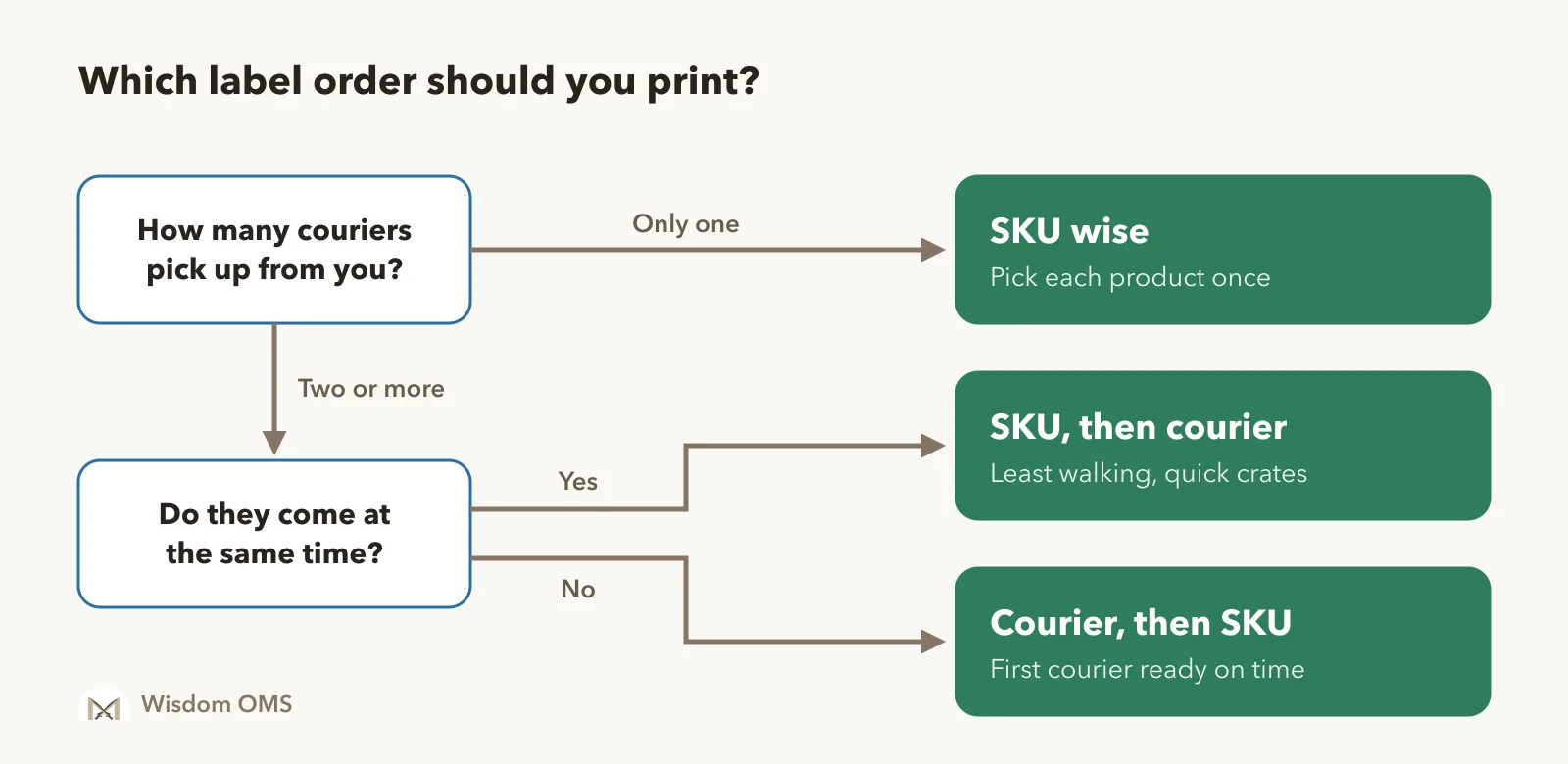
- Use two levels. "SKU, then courier" suits one common pickup time; "courier, then SKU" suits couriers who come at different times.
- Sorting only works if your SKU names are clean. RED-KURTI-L and Red Kurti L can print as two separate groups.
What does Meesho label sorting mean?
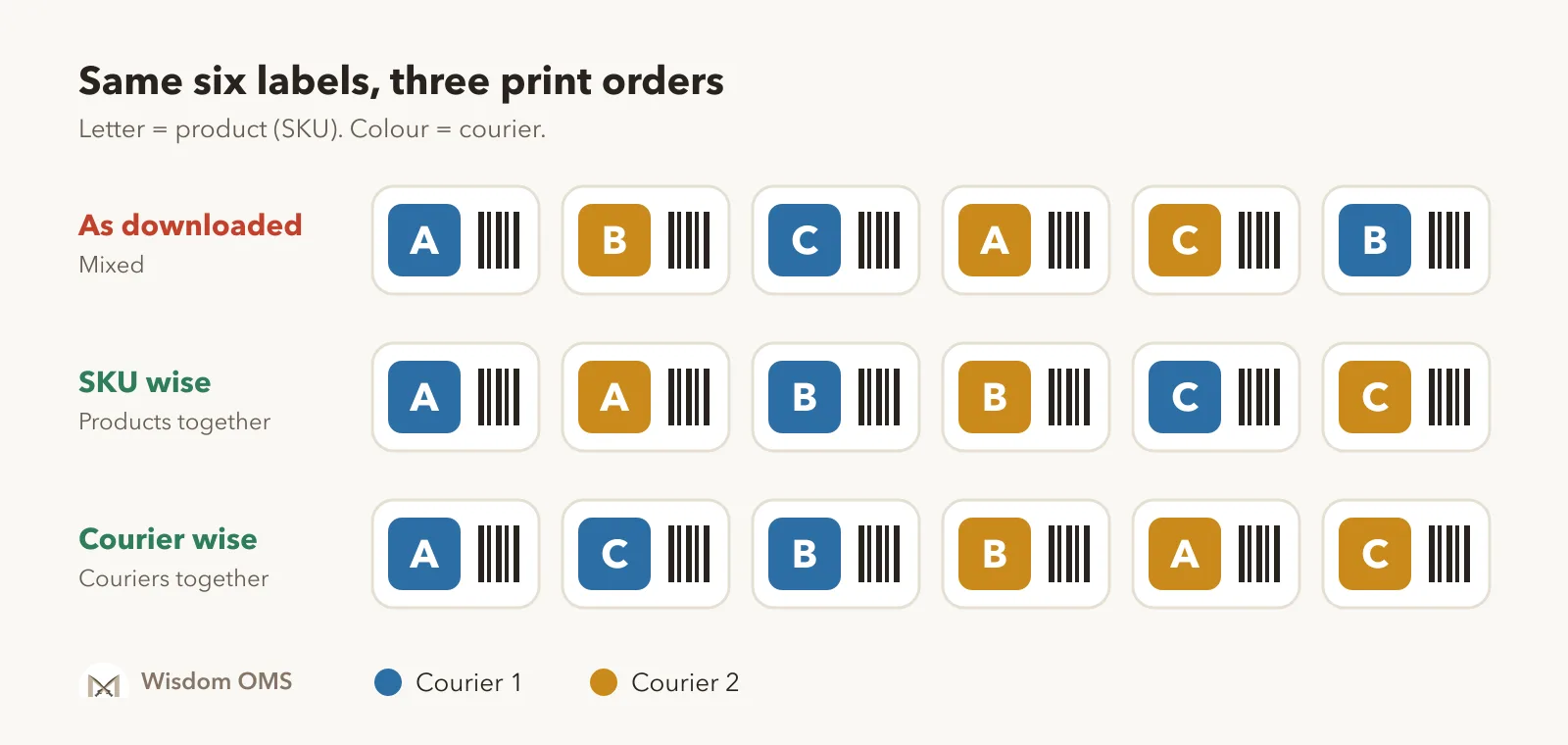
Meesho label sorting means changing the order of the pages in your label PDF so that similar orders print next to each other. Nothing on the label changes. Only the sequence does.
Two words you will see often. An SKU (stock keeping unit) is the code you gave a product and its size or colour, such as RED-KURTI-L. The courier is the delivery partner named on the label; Meesho assigns it, so one day's orders are usually split between several.
Sorting and cropping are separate jobs. Cropping cuts the label out of the A4 page so it fits a 4x6 sticker. If you have not set that up yet, start with our Meesho label crop guide, then come back here for the print order.
SKU wise or courier wise: which label order is better?
Choose SKU wise if most of your time goes into finding products, and courier wise if most of it goes into separating parcels at pickup. If you have both problems, use a two-level sort.
| Print order | Best for | Weak point |
|---|---|---|
| As downloaded | A handful of orders a day | A trip to the rack for almost every label |
| Courier only | Very few products, several couriers | Products are still mixed inside each courier |
| SKU only | Many orders for few products, one courier | Parcels must be separated by courier after packing |
| SKU, then courier | Several couriers, one pickup time | No courier is complete until you finish all SKUs |
| Courier, then SKU | Couriers arriving at different times | You visit a popular product's rack once per courier |
How much time does sorting save? A 120-order example
In the example below, sorting cuts picking and separating from 66 minutes to 14. The numbers are made up to show the working, so replace them with your own.
Say you ship 120 single-piece orders across 12 SKUs and 3 couriers, and every SKU has orders on every courier. That makes 12 × 3 = 36 groups. Assume these timings:
- A trip to the rack for one piece takes 25 seconds; a trip for a whole group takes 40 seconds.
- Putting one packed parcel in the right courier pile takes 8 seconds; putting a whole group in takes 10 seconds.
| Print order | Picking | Separating | Total |
|---|---|---|---|
| As downloaded | 120 × 25 s = 50 min | 120 × 8 s = 16 min | 66 min |
| Courier only | 120 × 25 s = 50 min | Already done | 50 min |
| SKU only | 12 × 40 s = 8 min | 120 × 8 s = 16 min | 24 min |
| Courier, then SKU | 36 × 40 s = 24 min | Already done | 24 min |
| SKU, then courier | 12 × 40 s = 8 min | 36 × 10 s = 6 min | 14 min |
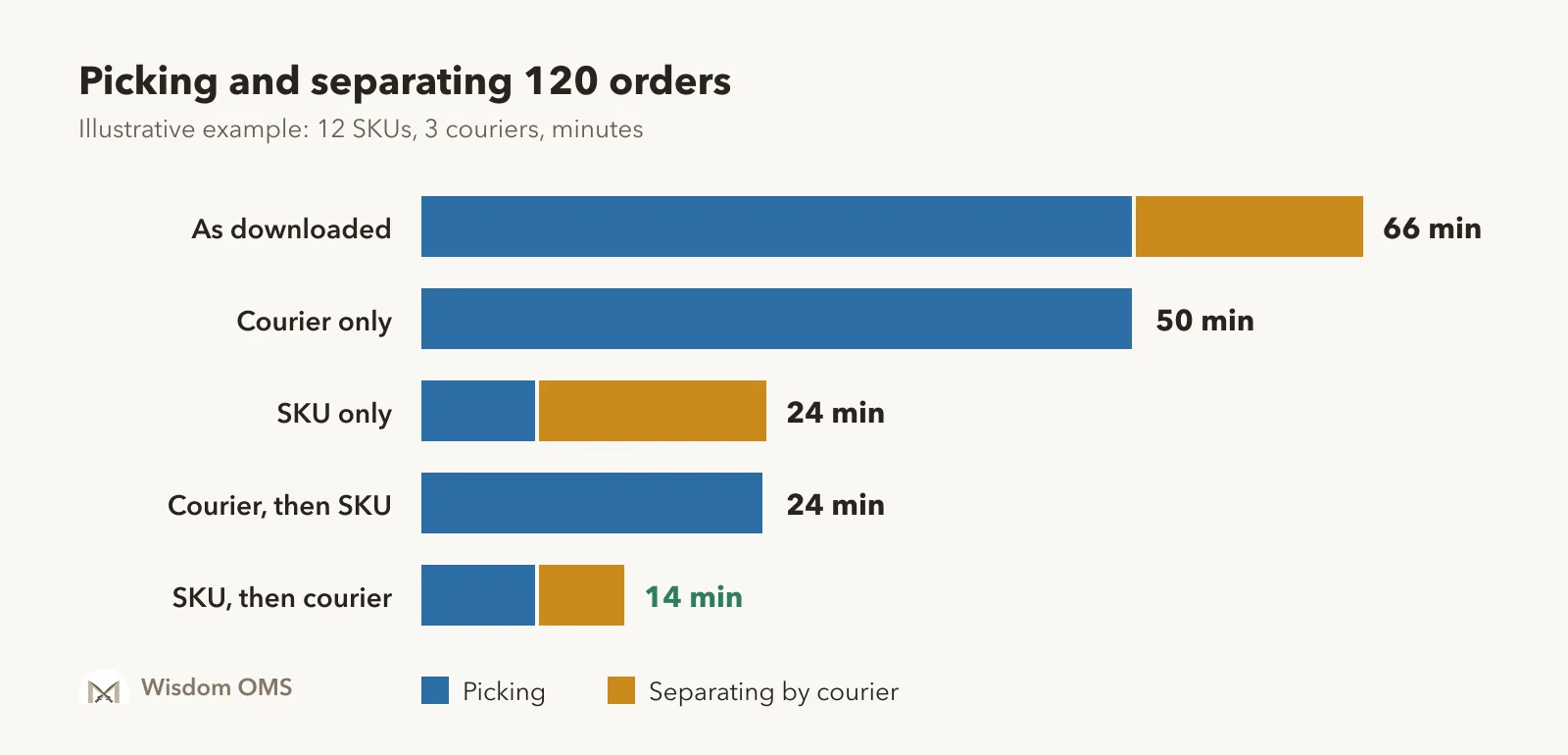
Two lessons from this. Grouping by SKU pays off most when a few products make up most of your orders. And "courier, then SKU" is slower on paper, but it is still the right choice when one courier comes at 1 pm and another at 5 pm, because the first stack is complete on time.
How to sort Meesho labels, step by step
Clean your SKU names, download one PDF for the whole pickup, sort it by your chosen order, check the count and print. Here is the full routine.
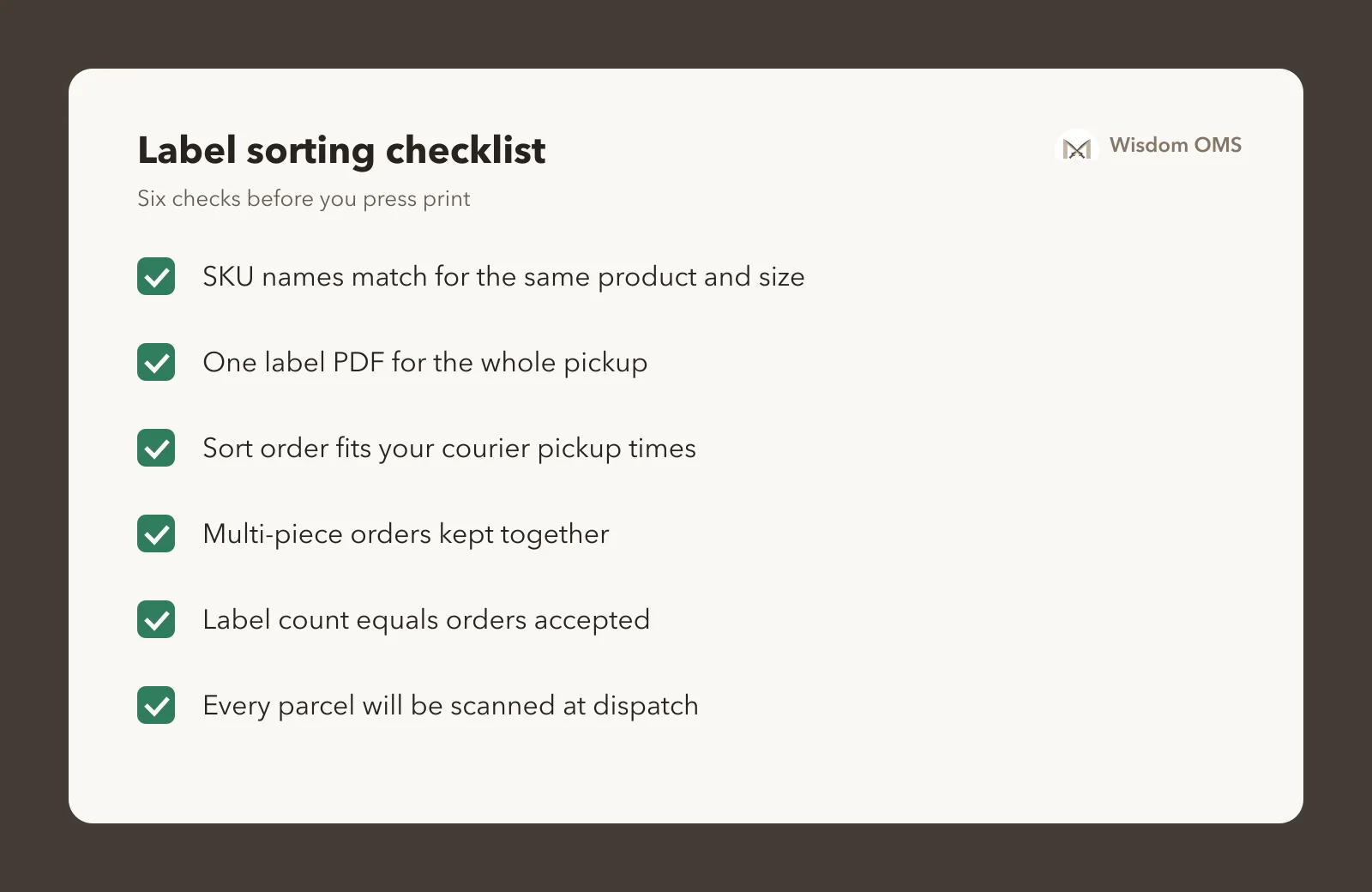
- Fix SKU names first. Use one pattern everywhere, for example product-colour-size. Avoid extra spaces and spelling variations.
- Download the day's labels together. Ten small files sorted one by one give you ten small runs, with the same product in all of them.
- Sort before you print. Use a label tool or order software that can read the SKU and courier from each label. Sorting printed stickers by hand takes back much of the time you save.
- Put multi-piece orders together. An order with two or more items should not hide in a run of singles, because that is where a packer ships one piece instead of two.
- Count the pages. Labels in the sorted file should equal orders accepted. A missing page is an order that will not ship.
- Print a matching picklist. A picklist is a list of how many pieces of each SKU you need. Pull stock against it once, then pack in label order.
No sorting tool? Do this by hand
If you pack under about 30 orders a day, fan the printed labels out on a table and make one pile per product. Clip each pile, then order each pile by courier. Keep one crate per courier at the packing desk and drop parcels straight in.
Four sorting mistakes that send out wrong parcels
Sorted labels make packing faster, and fast packing hides mistakes unless you check. Watch for these four.
- Sizes in one pile. RED-KURTI-L and RED-KURTI-XL print back to back. Say the size aloud or scan the item when the SKU changes.
- Stock runs out mid-run. With ten labels for a product and eight pieces, two labels stay behind. Set them aside at once, so nobody sticks them on something else.
- Cancelled orders in the stack. An order can be cancelled after you print. Scanning each parcel at dispatch catches it before it leaves.
- Printing the same batch twice. Mark or file each batch as done. If a wrong parcel does come back, follow our steps for a Meesho wrong return claim, also available in Hindi.
How Wisdom OMS handles this
In Wisdom OMS you choose the label order once in Warehouse Settings → Labels & Shipping, including a "SKU, then courier" choice. When you need to sort a PDF yourself, Crop/Sort Labels crops Meesho labels, sorts them courier wise, and gives a zip with a separate file for each courier.
Selling the same item under different SKU names in different stores? The Master SKU choice prints every store and variant SKU of one inventory item together, courier by courier inside it. So your packer visits that rack once, whichever store the order came from.
The rest of the desk follows the same idea. Print a picklist with photos, or list items A-Z. Open the SLA Date tab in Pending orders to see how many orders are due each day and download just those labels. Every batch stays in Labels History, so you can print it again and see who downloaded it. At the end, dispatch scanning checks parcels before they leave, and if a courier did not collect some Meesho orders, you can raise that complaint from the RTD tab. See more on the Wisdom OMS product page.
Frequently asked questions
How do I sort Meesho labels SKU wise?
Download all the day's labels in one PDF and use a label tool or order management software that reads the SKU and reorders the pages. Keep SKU names identical for the same product, otherwise one product can split into several groups. Check that the sorted file has as many labels as you have orders.
How do I sort Meesho labels courier wise?
Use a label tool that reads the courier name on each label, and either group the pages by courier in one PDF or save one file per courier. Print each courier's labels together and keep its parcels in a separate crate. At pickup you only need to count and hand over that crate.
Can I sort Meesho labels by SKU and courier together?
Yes. Use a two-level sort. "SKU, then courier" keeps each product together and groups couriers inside it, which suits a single pickup time. "Courier, then SKU" finishes one courier before starting the next, which suits different pickup times.
Can I choose the courier for my Meesho orders?
The courier is normally assigned to the order by Meesho and printed on the label. Sorting does not change it; it only groups the labels so each courier's parcels are easy to hand over.
Does sorting change anything on the Meesho label?
No. Sorting only changes the order of the pages. The address, barcode and tracking number (AWB) stay the same, so the courier scans the label as usual.
Print in the order you pack
Start tomorrow with one change: sort by SKU, then courier if everyone picks up together, or by courier, then SKU if they do not. Time one batch before and one after, and keep what works. Start free with Wisdom OMS to sort, print and scan orders for all your stores in one place, or get the Wisdom app on Google Play.