
You sell on Meesho and Flipkart, maybe Amazon too. Every morning you open three seller panels, download three sets of labels, and keep one spreadsheet for stock that is never quite right. Then a cancelled order gets packed anyway, a return sits unopened past its claim window, and a payout comes in short and nobody notices for a month.
That is the problem an order management system (OMS) solves. This guide explains what an OMS is in plain words, how an order moves through one, how it differs from inventory or warehouse software, and how to tell when your business needs one. It is written for Indian marketplace sellers, not for big retail chains.
Key takeaways
- An OMS is software that brings orders from all your sales channels into one place and tracks each order from the moment it arrives until the money for it is in your bank.
- For marketplace sellers the useful parts are: one order list, one stock count across stores, labels and picklists in bulk, dispatch and return scanning, and payment matching.
- An OMS is not the same as inventory software or a warehouse system. Inventory software counts stock; an OMS runs the order around it.
- If you sell on more than one marketplace, or have staff packing for you, you will usually save more time than an OMS costs.
What is an order management system?
An order management system is software that collects every order you receive, from every marketplace and store, into one list and manages each order through its whole life: confirming it, reserving stock, printing the label, packing, handing it to the courier, and following up on delivery, return and payment.
OMS is simply the short form of order management system. In ecommerce, people use "OMS" for any tool that does this job across channels. Without one, the "system" is usually the seller panels plus a spreadsheet plus someone's memory. That works at 20 orders a day. It breaks at 200, and it breaks badly during a sale.
How an order moves through an OMS
Every order goes through the same stages, whichever marketplace it came from. An OMS shows you which stage each order is in, so nothing gets stuck without anyone noticing.
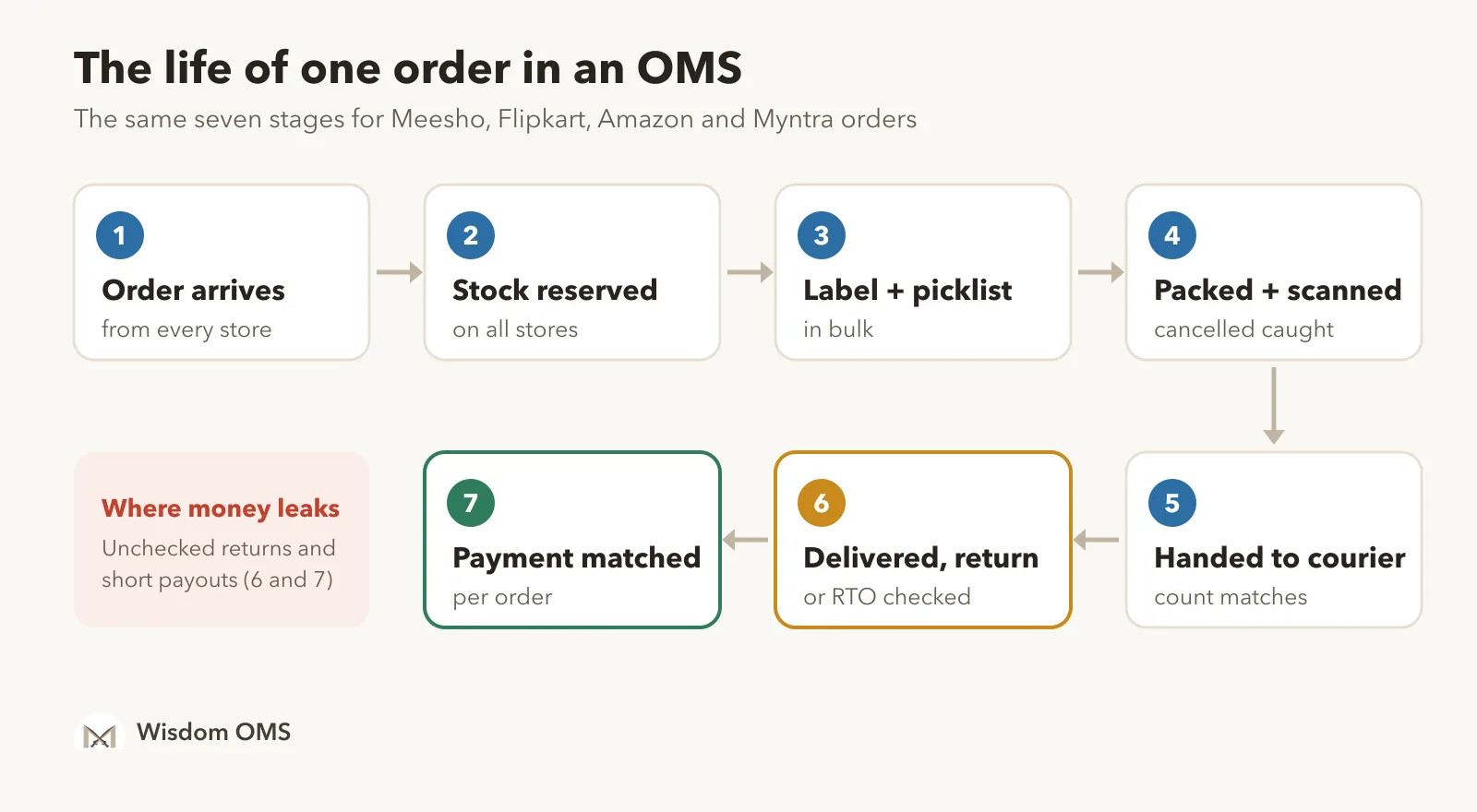
- Order arrives. The OMS pulls new orders from each connected store, so you see Meesho, Flipkart, Amazon and Myntra orders in one list.
- Stock is reserved. The item's count goes down everywhere, not just on the store where it sold. This is what stops overselling.
- Label and picklist. You download labels for many orders at once, cropped and sorted, and print a picklist grouped by product so packers pick each item once.
- Packed and scanned. Scanning each parcel before it leaves the packing table catches orders that were cancelled after the label was printed.
- Handed to the courier. Orders are marked ready to ship before the cut-off, and the handover count is checked against the scans.
- Delivered, returned or RTO. RTO means the buyer never accepted the parcel. Returns and RTO parcels are scanned when they come back, checked, and claimed if they are wrong or damaged.
- Payment matched. The payout for each order is matched with what you expected, so short payments and wrong deductions show up.
OMS vs inventory software vs WMS vs ERP
These names get mixed up, and sellers sometimes buy the wrong tool. The short version: inventory software counts stock, a WMS runs a big warehouse, an ERP runs the accounts of a whole company, and an OMS runs the orders.
| Tool | Main job | Who it suits |
|---|---|---|
| Order management system (OMS) | Collects orders from every channel and tracks each one to delivery, return and payment | Sellers on one or more marketplaces, from a few dozen orders a day upwards |
| Inventory management software | Keeps the stock count for each product and location | Any business with stock; an OMS usually includes a simpler version of this |
| Warehouse management system (WMS) | Runs a large warehouse: bins, racks, putaway, many pickers | Big warehouses and fulfilment companies |
| ERP / accounting software | Accounts, GST, purchase, billing for the whole business | Every business, alongside an OMS rather than instead of it |
For most marketplace sellers in India, the right pair is an OMS for orders and stock, plus accounting software for books and GST.
Do you need an OMS? Five signs
You probably need one if two or more of these are true for your business:
- You sell on more than one marketplace, or have more than one store on the same one. Every extra panel means another login, another label download and another stock count to keep in sync.
- You have oversold or shipped a cancelled order in the last month. Both are signs that stock and order status are not reaching the packing table in time.
- Someone else packs for you. Staff need to see and scan orders without access to your payments or purchase costs.
- Returns come back and nobody checks them the same day. Claim windows on marketplaces are short. Check the current window on your seller panel.
- You don't know which orders were actually paid. If you only look at the total payout, short payments stay hidden.
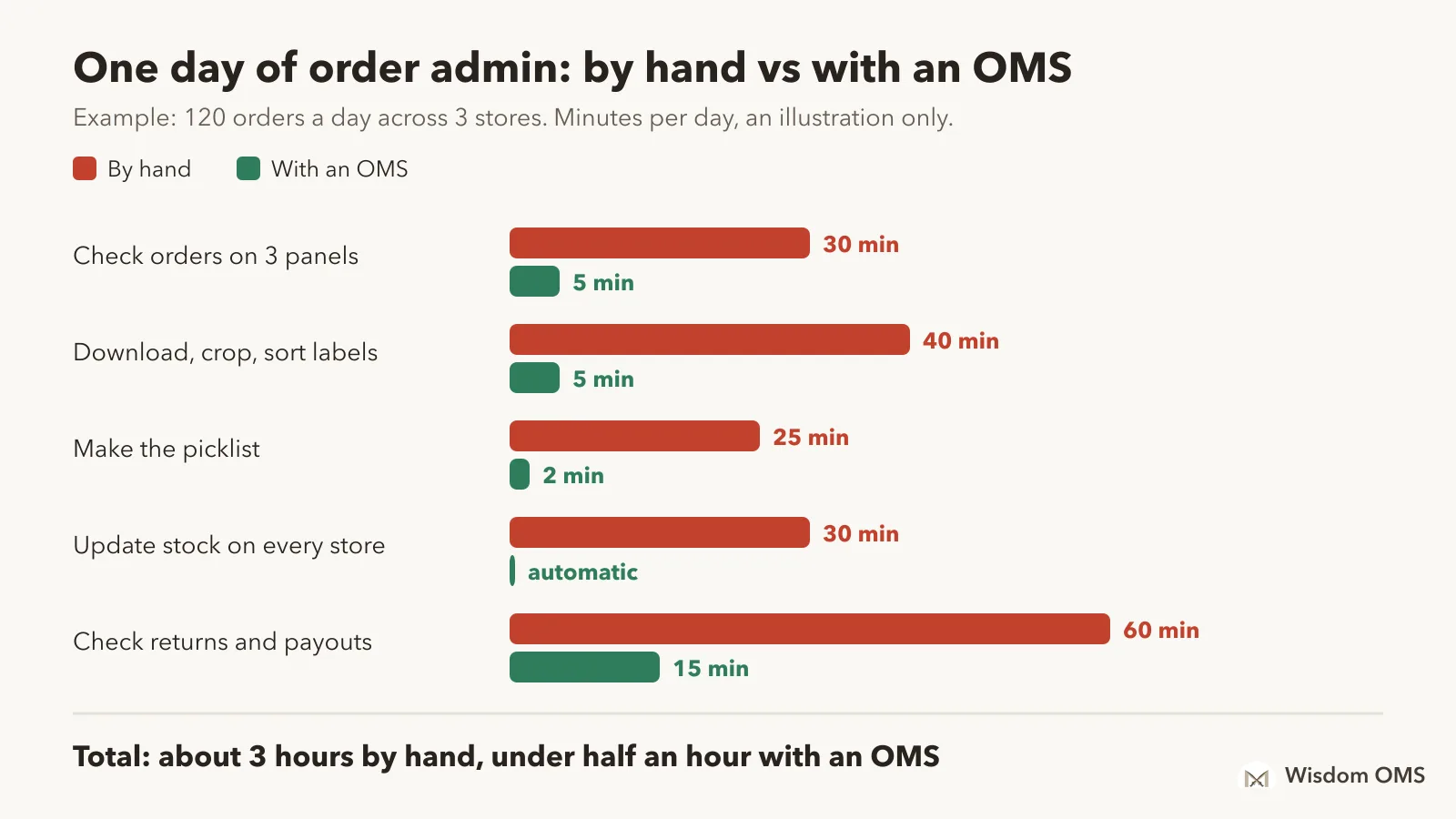
Here is a rough example of what the daily work looks like with and without a system, for a seller with about 120 orders a day across three stores. Your own times will differ; do the same sum with your numbers.
What to check before you choose an OMS
Most OMS products look similar on a features page. These are the questions that separate a tool that fits Indian marketplace selling from one that doesn't:
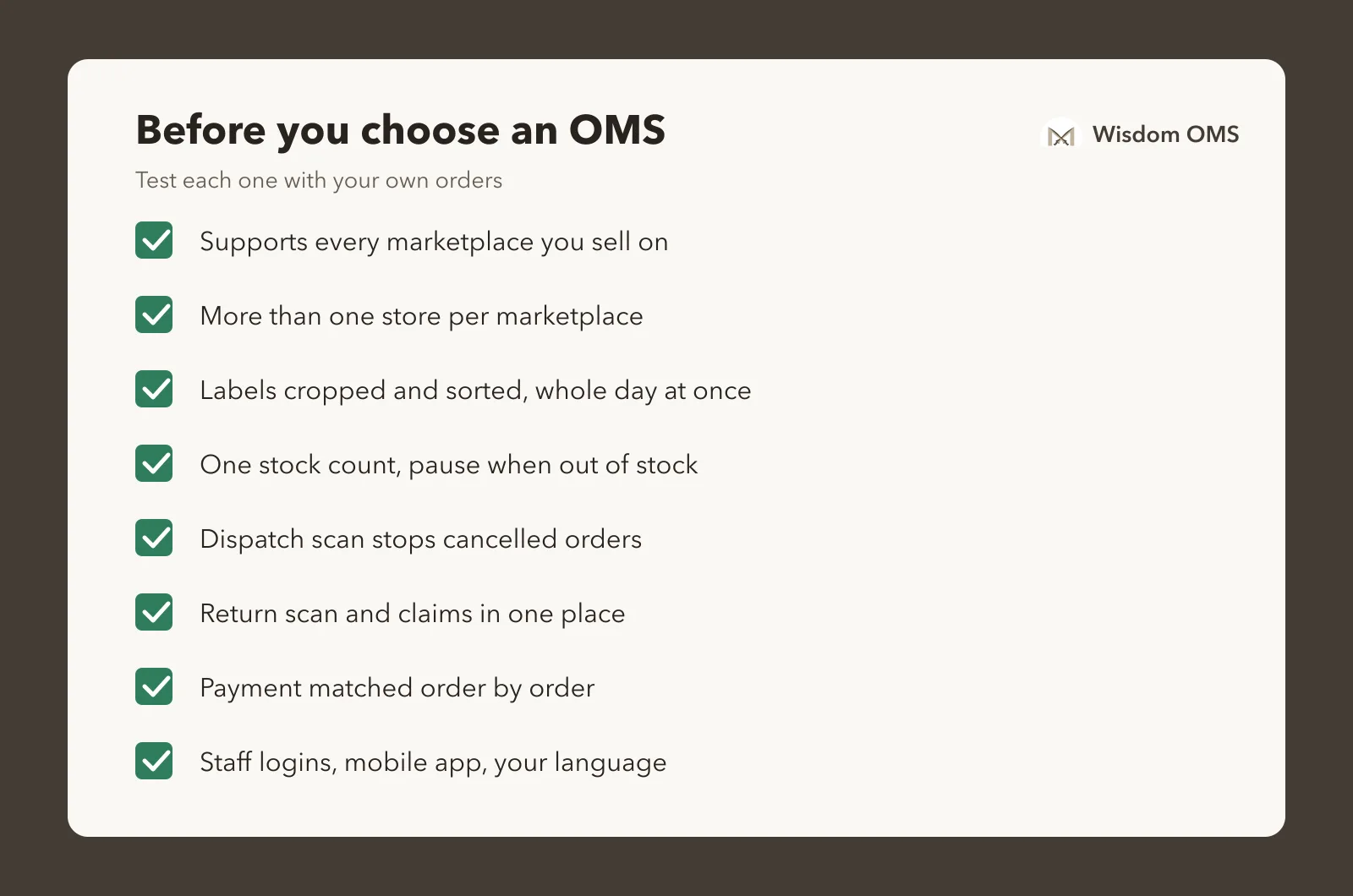
- Marketplaces and stores. Does it support every marketplace you sell on, and more than one store on each?
- Labels. Can it crop and sort labels by courier, for the whole day's orders at once?
- Stock. Does one sale reduce stock on every store? Can it pause a listing when an item runs out?
- Scanning. Does dispatch scanning stop cancelled and duplicate orders before they leave?
- Returns. Can you scan returns, spot the wrong ones and raise claims from the same place?
- Payments. Does it match each order's payout, not only the total?
- Staff. Can you give packers their own login without showing your costs and payments?
- Phone and language. Is there a mobile app, and help in the language your team reads?
For a deeper list, see our post on key features to look for in an OMS.
How Wisdom OMS handles this
Wisdom OMS is built for Indian marketplace sellers. It connects your Meesho, Flipkart, Amazon, Myntra and Snapdeal stores, including several stores on the same marketplace, and puts every order in one list.
- One stock count across all stores, with an option to pause Meesho listings automatically when an item runs out.
- Labels for the whole day in one download, cropped and sorted, with a courier-wise file for handover.
- Picklists grouped by product, with an option to print each item's purchase cost.
- Dispatch scanning that flags cancelled and duplicate orders, and return scanning with claims from the same screen.
- Payment reconciliation that shows what each order was actually paid, and a full timeline of every scan, label, payment and ticket on each order.
- Staff logins with roles, invited over WhatsApp, and step-by-step tutorials in English, Hindi and Gujarati.
More than 10,000 Indian online sellers use Wisdom. See everything it does on the Wisdom OMS product page.
Frequently asked questions
What is the full form of OMS?
OMS stands for order management system. In ecommerce it means software that collects orders from all your sales channels into one place and tracks each order until it is delivered, returned and paid.
What is an OMS in ecommerce?
In ecommerce, an OMS is the tool that sits between your marketplaces and your packing table. It brings in orders from every store, keeps one stock count, produces labels and picklists, and follows each order through delivery, returns and payment.
Is an OMS the same as inventory management software?
No. Inventory software only keeps the stock count. An OMS manages the whole order, and most order management systems include stock tracking as one part of that. A seller with several marketplaces needs the order side, not just the count.
Does a small seller need an OMS?
A seller with one store and a handful of orders a day can manage with the seller panel. Once you add a second marketplace, a second store or a packer, the time spent on logins, labels and stock updates grows fast, and that is usually the point where an OMS pays for itself.
How much does an OMS cost?
Prices vary by product and by order volume. Look for one you can try on real orders before paying. Wisdom OMS is free for your first 3 days, then you pay only for the orders you process. See the current prices on the pricing page.
Try it on your own orders
The quickest way to know whether an OMS helps is to connect your stores and run one normal day through it. Start free with Wisdom OMS, or get the Wisdom app on Google Play. Getting ready for a sale? Our festive-season warehouse checklist walks you through it week by week, and our guide on multi-channel order management goes deeper on selling across marketplaces.