

Every festive season, the same thing happens in hundreds of small warehouses across Surat, Jaipur, Delhi and Tiruppur. Orders jump to two, three, sometimes five times a normal day. The labels pile up, the packers work past midnight, and somewhere in the rush a cancelled order gets shipped, a red kurti goes out in place of a blue one, and a parcel sits in the corner because nobody noticed the courier didn't take it.
None of these mistakes is expensive alone. Together, over three weeks of sale traffic, they can eat most of what the season was supposed to earn. This Diwali sale warehouse checklist is for Meesho, Flipkart, Amazon and Myntra sellers who want the extra orders without the extra losses. It goes week by week, from four weeks before the sale to the returns that arrive a month after it.
Key takeaways
- Do the capacity maths now: three times the orders usually means at least twice the packers and a second packing desk.
- Fix stock and SKU mapping before the sale. Overselling during a sale costs you cancellations and a worse seller rating.
- On sale days, pick by SKU, scan every parcel, sort by courier and mark orders ready before the courier's cut-off.
- Plan for the second peak: returns and RTO land two to three weeks after the sale, and claim windows are short.
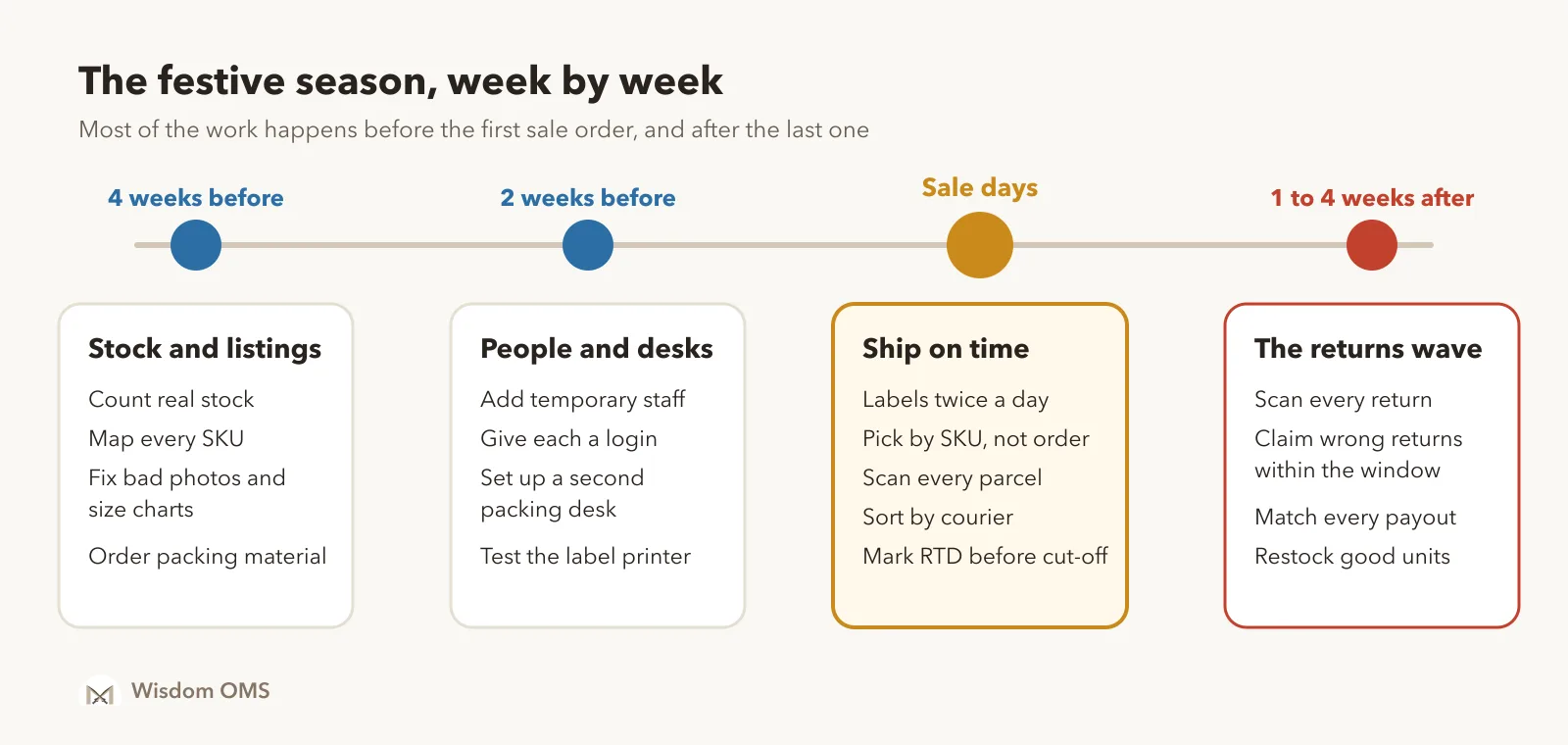
4 weeks before: get stock and listings right
Overselling is the most avoidable festive-season loss. If the same 40 pieces are listed on Meesho, Flipkart and Amazon, and your stock count is a guess, the sale will find the gap for you. You will cancel orders, and the marketplace will remember.
- Count real stock. Physically count your top 50 SKUs. Update the number everywhere, not just on one panel.
- Map every listing to one stock item. A kurti listed in three stores should draw from one stock count. If two listings point to separate counts, you are selling the same piece twice.
- Decide what happens at zero. When a size runs out mid-sale, the listing should pause on its own. Nobody will have time to do it by hand at 11 pm.
- Fix the listings that already get returns. Look at last month's return reasons. If "size issue" keeps showing up on one product, fix its size chart now. A bad size chart during a sale multiplies returns.
- Order packing material for the peak, not the average. Polybags, tape, thermal labels and printer ribbons run out first.
2 weeks before: plan people, desks and printers
Here is a simple way to size your team. Say you normally ship 150 orders a day and expect three times that during the sale. If one packer takes about three minutes per parcel, including picking, packing and labelling, the numbers look like this:
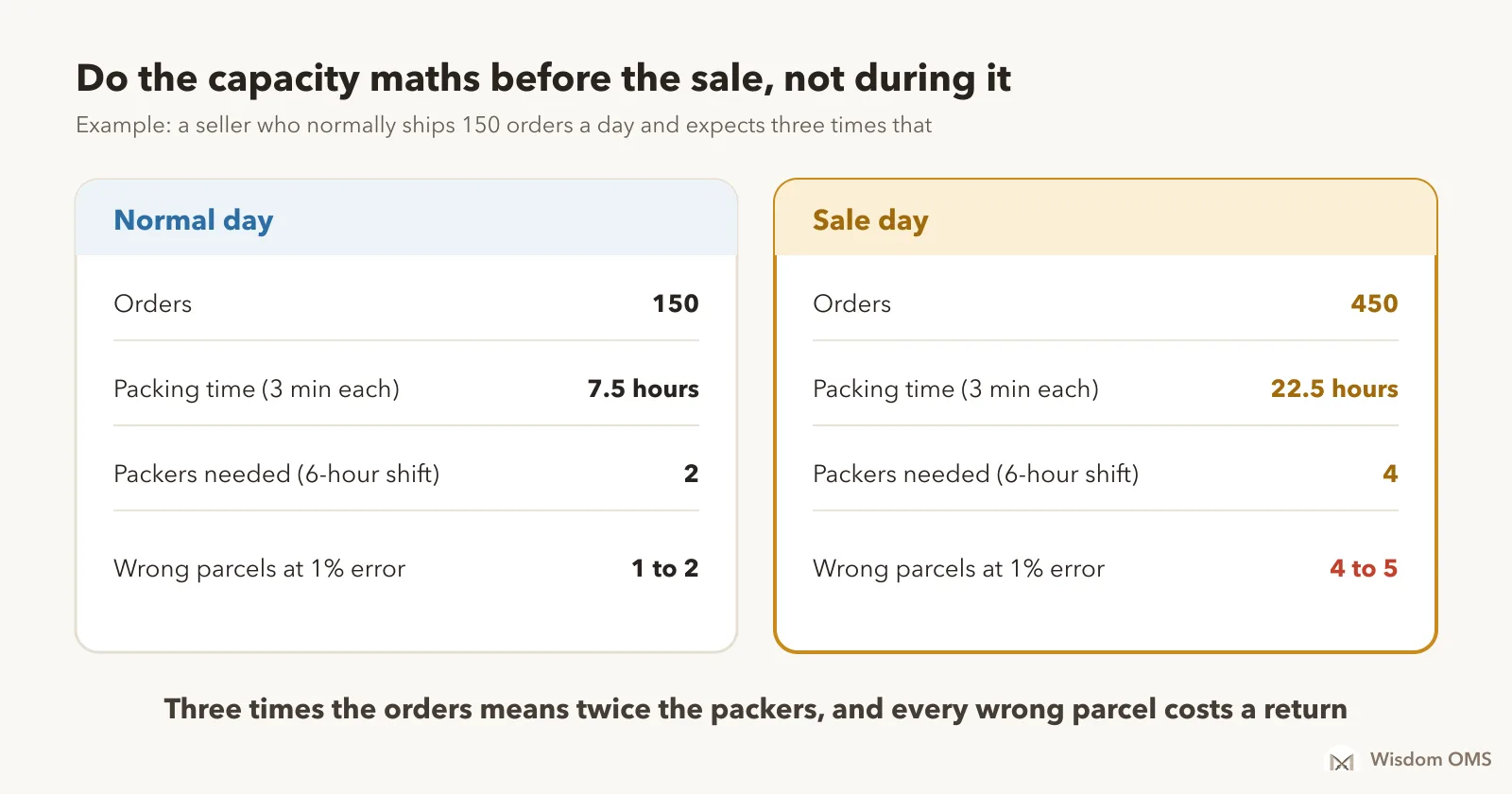
The last row is the one sellers forget. A 1% error rate is fine on a normal day: one or two wrong parcels. On a sale day it becomes four or five, every day, each one coming back as a return with two-way shipping attached. Error rates also go up when people are tired and new staff are on the table.
- Bring in temporary staff now, not on the first sale morning. Give them a day of practice on real orders.
- Give each person their own login with only what they need, such as packing and scanning, not your payment reports or purchase costs. When something goes wrong you will know whose shift it was.
- Set up a second packing desk with its own scanner and, if you sell on Flipkart, its own packing camera.
- Test the label printer with a full day's labels. Check the label size, the crop, and how long a 400-label print actually takes.
Sale days: ship on time, ship the right thing
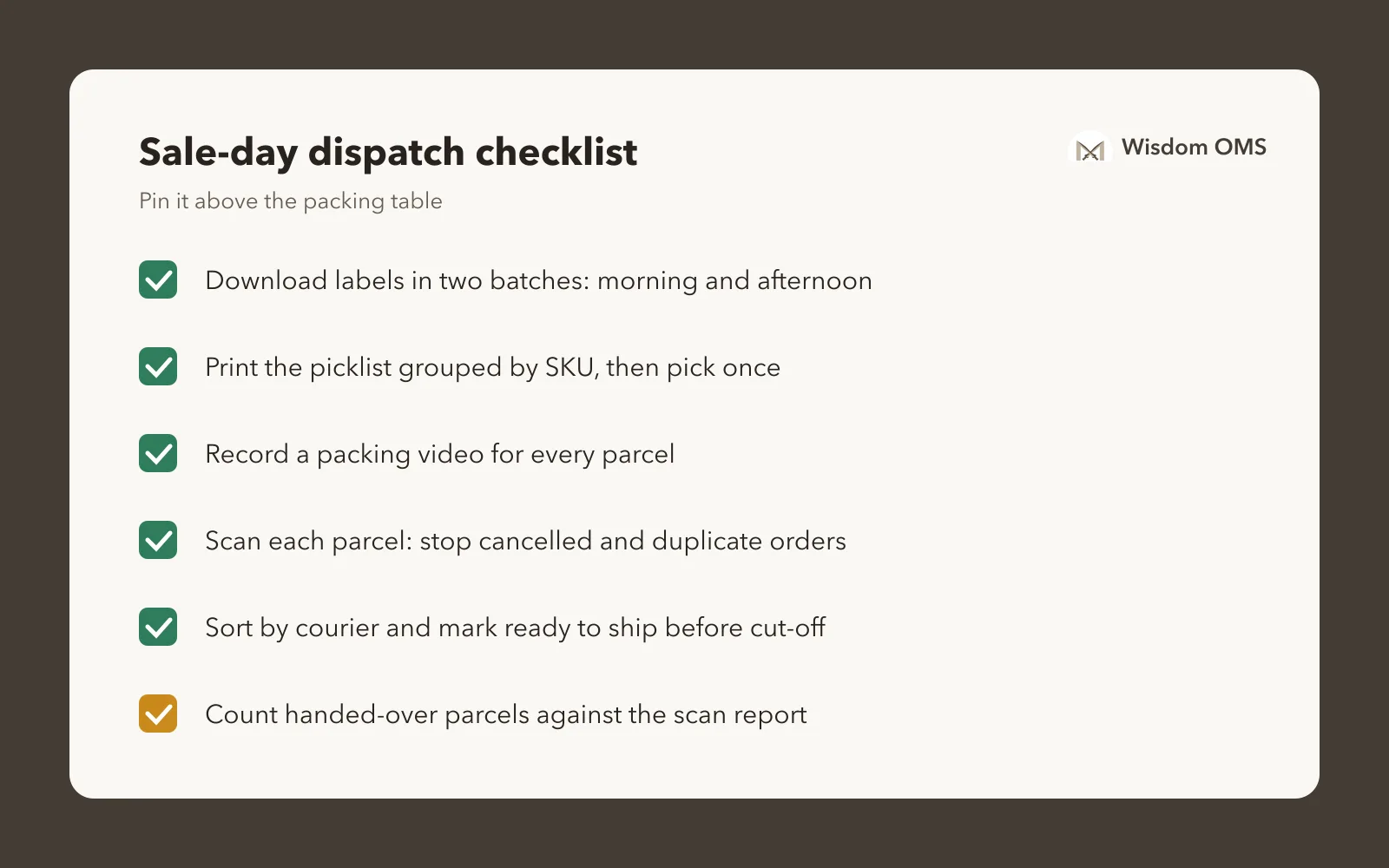
During the sale, the goal is simple: every order leaves on time, in the right parcel, with proof. These habits make the difference:
- Download labels in two batches. One in the morning and one in the afternoon, so the afternoon orders still make today's pickup.
- Crop and sort labels before printing. Sorted by courier, the stack you print is already in pickup order.
- Pick by SKU, not by order. A picklist that groups all 37 units of one SKU means one trip to that shelf, not 37.
- Record packing videos. When a buyer claims an empty box or a wrong item, a video of that exact parcel being packed is your best evidence.
- Scan every parcel before it leaves the table. A scan catches the order that was cancelled after its label was printed, and the duplicate label printed twice. Both are common in a rush.
- Mark orders ready to ship before the courier's cut-off, and count the parcels you hand over against your scan report. A parcel the courier did not collect is worth reporting the same day.
1 to 4 weeks after: the returns wave
The sale ends, the orders slow down, and two to three weeks later the second peak arrives: returns and RTO parcels. More orders shipped means more coming back, and festive buyers return more often, because gifts don't fit or arrive after the occasion.
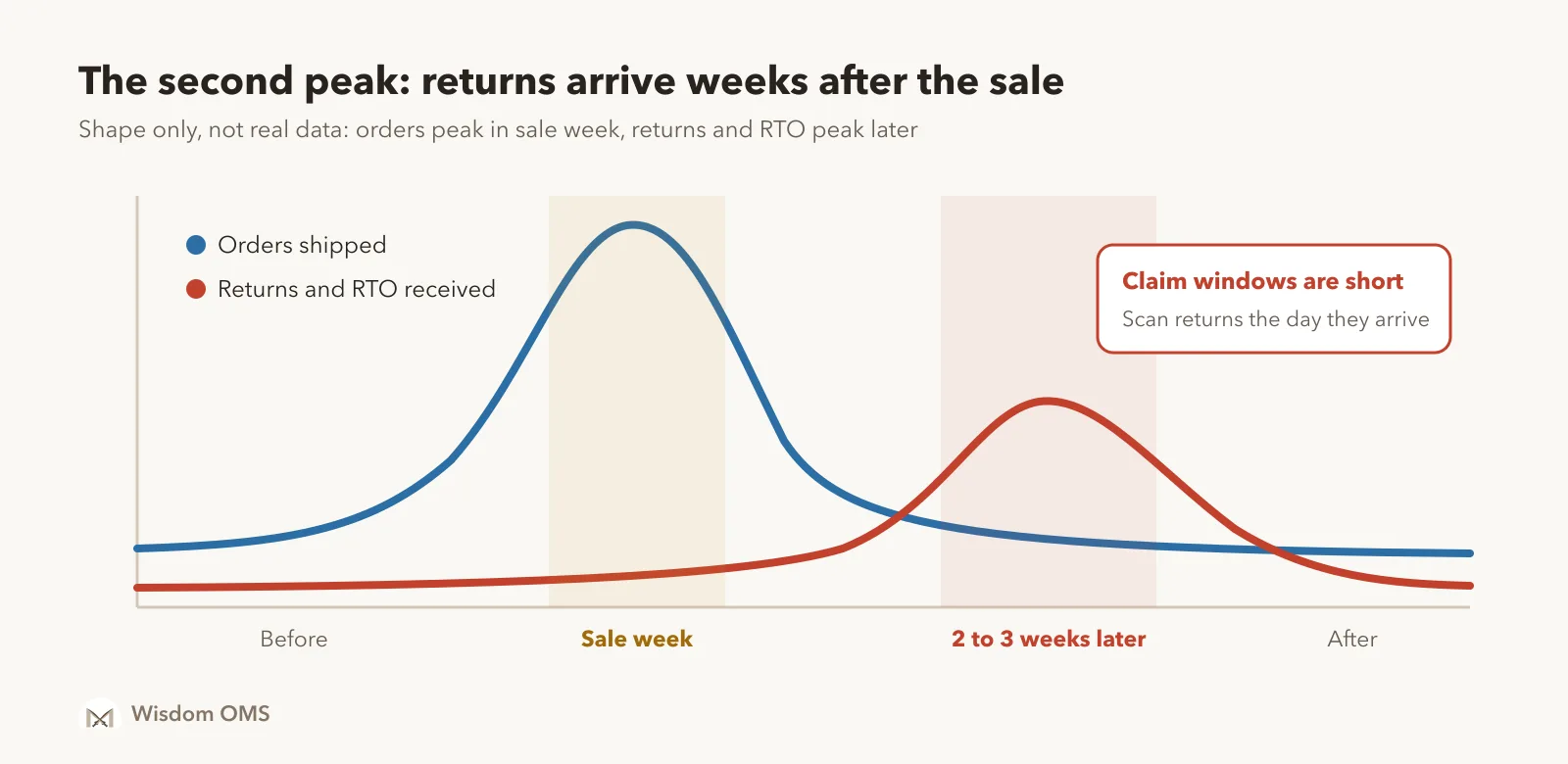
This is where festive money is quietly lost, because nobody is watching the returns as closely as they watched the orders.
- Scan every return the day it arrives. Open it on camera. Check that the product, size and colour match what you shipped.
- Claim wrong and damaged returns quickly. Marketplaces give you a limited window to raise a claim, and it is usually days, not weeks. Check the current window on your seller panel and don't let returns sit unopened.
- Separate RTO from customer returns. An RTO (the buyer never accepted the parcel) and a customer return cost you different amounts. Mixed together, they hide which products are really the problem.
- Restock good units at once, so returned stock is back on sale while demand is still high.
- Match every payout. After the season, check that each delivered order was actually paid, and that deductions are what you expected. Short payments are easy to miss when 3,000 orders settle in one month.
For more on handling returns, see our guide on how an order management system helps with returns and refunds.
How Wisdom OMS handles the festive rush
Wisdom OMS brings your Meesho, Flipkart, Amazon, Myntra and Snapdeal stores into one dashboard, so the sale is one queue of orders and not five browser tabs.
- One stock count across every store, with an option to pause Meesho listings automatically when an item runs out.
- Labels for the whole day in one click, cropped and sorted, with a courier-wise download. Big downloads build in the background and arrive in your notifications.
- Picklists grouped by SKU, with an option to print each item's purchase cost.
- Dispatch scanning that flags cancelled and duplicate orders before they leave, and a daily scanning report to count handovers against.
- Staff logins with roles, invited over WhatsApp, with your costs and payments hidden from the packing team.
- Return scanning and claims from the same screen, and payment reconciliation that shows what each order was actually paid.
More than 10,000 Indian online sellers use Wisdom. See everything it does on the Wisdom OMS product page.
Frequently asked questions
How early should I prepare for the Diwali sale as a marketplace seller?
Start about four weeks before. That gives you time to count stock, fix listings that get returns, hire and train extra packers, and buy packing material before suppliers run short. The last two weeks should be for testing, not setting up.
How many extra packers do I need for a sale?
Work it out from your packing time. Multiply expected daily orders by minutes per parcel, divide by the minutes in a shift, and round up. At three minutes a parcel and six-hour shifts, 450 orders a day needs about four packers.
How do I stop shipping cancelled orders during a sale?
Scan every parcel against the live order status just before it leaves the packing table. Orders are often cancelled after the label is printed, and a scan is the only reliable way to catch them in a rush.
When do festive-season returns arrive?
Most returns and RTO parcels arrive two to three weeks after the orders ship, and some take longer. Plan for a second busy period after the sale, and keep enough staff to scan and check returns the day they arrive.
Get ready before the rush
The sellers who earn the most from the festive season are rarely the ones with the most orders. They are the ones who ship on time, ship the right thing, and catch every return and short payment afterwards. Start free with Wisdom OMS and get your stores, stock and dispatch set up before the first sale order lands. Prefer your phone? Get the Wisdom app on Google Play.